Weekly Monitoring Report: Share Athlete Data With All Staff
Learn how a structured weekly team monitoring report helps coaches share wellness, training load, and ACWR data with every staff member in one document.
Reporting
Turn monitoring data into one readable staff document
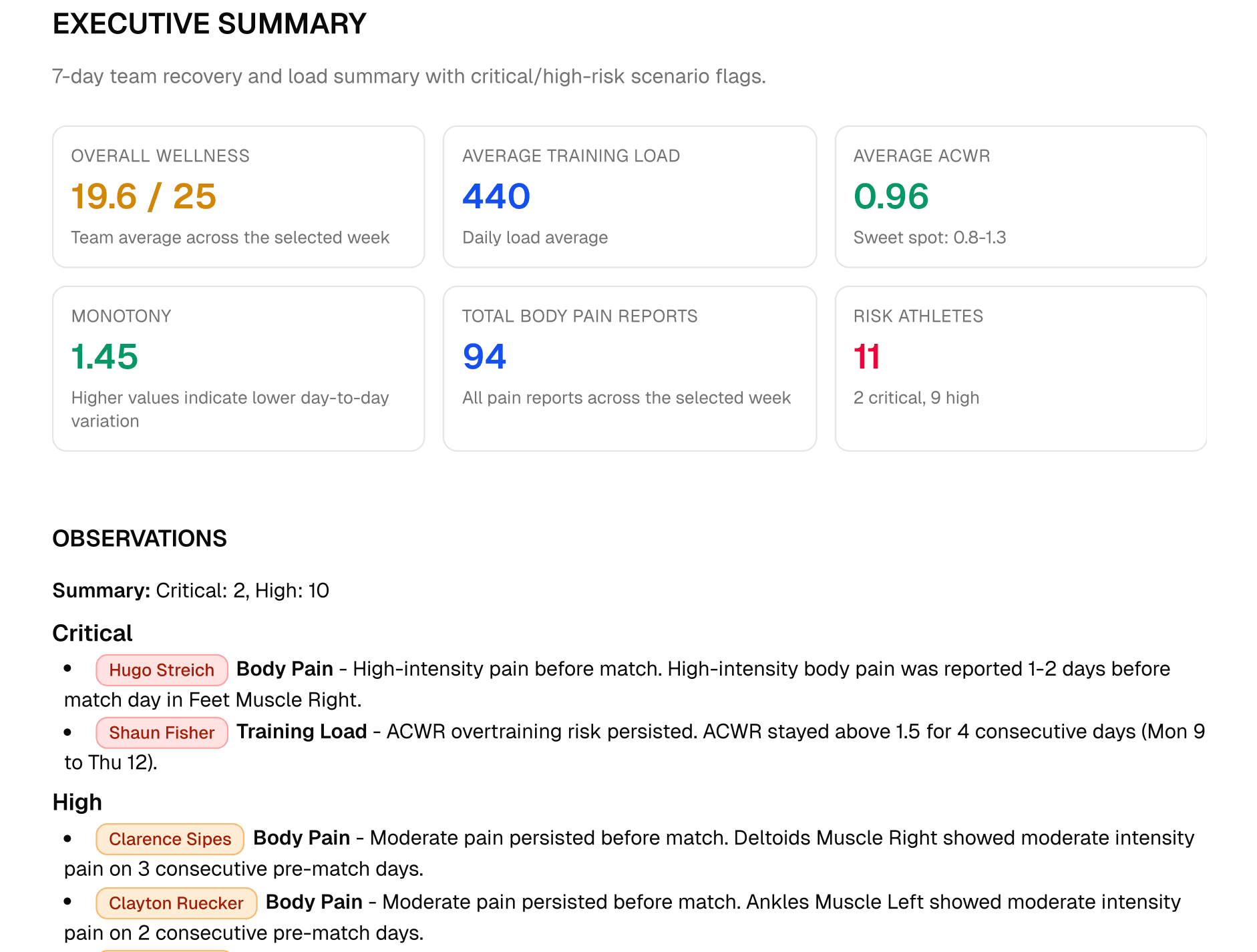
A weekly team monitoring report summarizes squad wellness, internal load, body pain, and athlete flags over a seven-day microcycle.
It is not a raw export
7d
Reporting window
Usually aligned to the competitive microcycle.
5
Wellness markers
Fatigue, sleep quality, stress, muscle soreness, and mood.
1
Shared document
A common source for coaches, medical staff, and directors.
2 min
Executive read
The top-level summary should be fast enough for non-specialists.
Report structure
Move from team summary to individual athlete flags
The report should answer the biggest questions first, then give staff enough context to follow up on the right athletes.
- 1
Executive summary
Lead with the weekly wellness trend, squad load direction, average ACWR, and the number of athletes needing attention.
- 2
Daily load trend
Show how load changed across the microcycle so coaches can see whether the squad is rising, stable, or tapering.
- 3
Wellness evolution
Track fatigue, sleep, stress, soreness, and mood as both team averages and athlete-level exceptions.
- 4
Body pain summary
Group discomfort by body region and severity so medical staff can spot repeated patterns.
- 5
Individual observations
Close with athlete-specific notes that explain the flag, likely context, and next review focus.
Minimum useful contents
- Internal load from session RPE and duration.
- Wellness markers across the full week.
- ACWR, monotony, and strain where enough history exists.
- Body pain location, severity, and trend.
- A short list of flagged athletes and recommended follow-up.
Sport context
Use the same format, then adapt the interpretation to the sport
The reporting template can stay consistent, but the load story changes by sport, fixture density, and player role.
Read the report against the match-day cycle
In football, the report helps staff see whether players returned from the last match with elevated fatigue, how soreness developed early in the week, and whether load tapered before the next fixture.
| Reader | What they need | Report design implication |
|---|---|---|
| Head coach | Squad readiness and key exceptions. | Put the executive summary and action list first. |
| Physiotherapist | Pain patterns and return-to-play context. | Show body region, severity, and history beside load changes. |
| Performance lead | The full load and wellness pattern. | Include trend detail and appendix-level diagnostics. |
| Club director | A concise picture of squad response. | Use plain language and avoid raw metric overload. |
Common mistakes
A report fails when it hides the decision inside the data
Most weak reports contain useful information, but they make the staff work too hard to understand what should happen next.
Reporting without context
Making it too detailed
Skipping the conversation
Sending it irregularly
Fractall workflow
Generate the report from the monitoring loop you already run
Fractall connects athlete check-ins, RPE, wellness, body pain, and load dashboards so staff can move from collection to a shareable weekly view.
From check-in to staff report
Athletes submit wellness and RPE from their mobile device, reducing the spreadsheet work that usually slows reporting down.
Coaches inspect load, wellness, ACWR, and body pain trends before the next planning conversation.
The weekly report turns the monitoring pattern into a document that the head coach, medical staff, and directors can understand.
Build a weekly reporting habit
Use Fractall to collect athlete data, review staff-ready trends, and turn monitoring into a shared weekly decision process.
FAQs
Weekly team monitoring report questions
Use these answers to align staff on what the report is for, who should read it, and where it fits in the weekly rhythm.
What should it include?
How often should it be sent?
Who should receive it?
Can it support return-to-play?
Coach checklist
- Executive summary is readable in under two minutes.
- Daily load trend includes thresholds and context.
- Wellness shows all five markers, not only an average.
- Body pain is visible for medical staff.
- Individual observations are specific and actionable.
- The report reaches head coach and medical staff.
- Send time is fixed and aligned to the microcycle.
Related guides
ACWR in Football: How to Use It Safely and Effectively
A coach-friendly guide to using 7-day acute and 21-day chronic workload ratios to manage football training load without turning ACWR into an injury prediction shortcut.
AI Reports for Coaches: What to Automate
A coach-first guide to using AI in sports performance reports without outsourcing selection, medical judgment, or player relationships.
Training Monotony and Strain: A Coach's Guide
Learn what training monotony and strain mean, how to calculate them from session RPE, and how football coaches can use them safely beside ACWR and wellness data.