1 Month Free Access (cancel anytime)

Import the file your GPS provider exports. Catapult, STATSports, Oliver Sports and WIMU CSVs parse on upload, and so does Vert's SportsCode XML. For anything else you map the columns yourself in the import screen. Fractall saves that layout per team so the next file goes straight through.
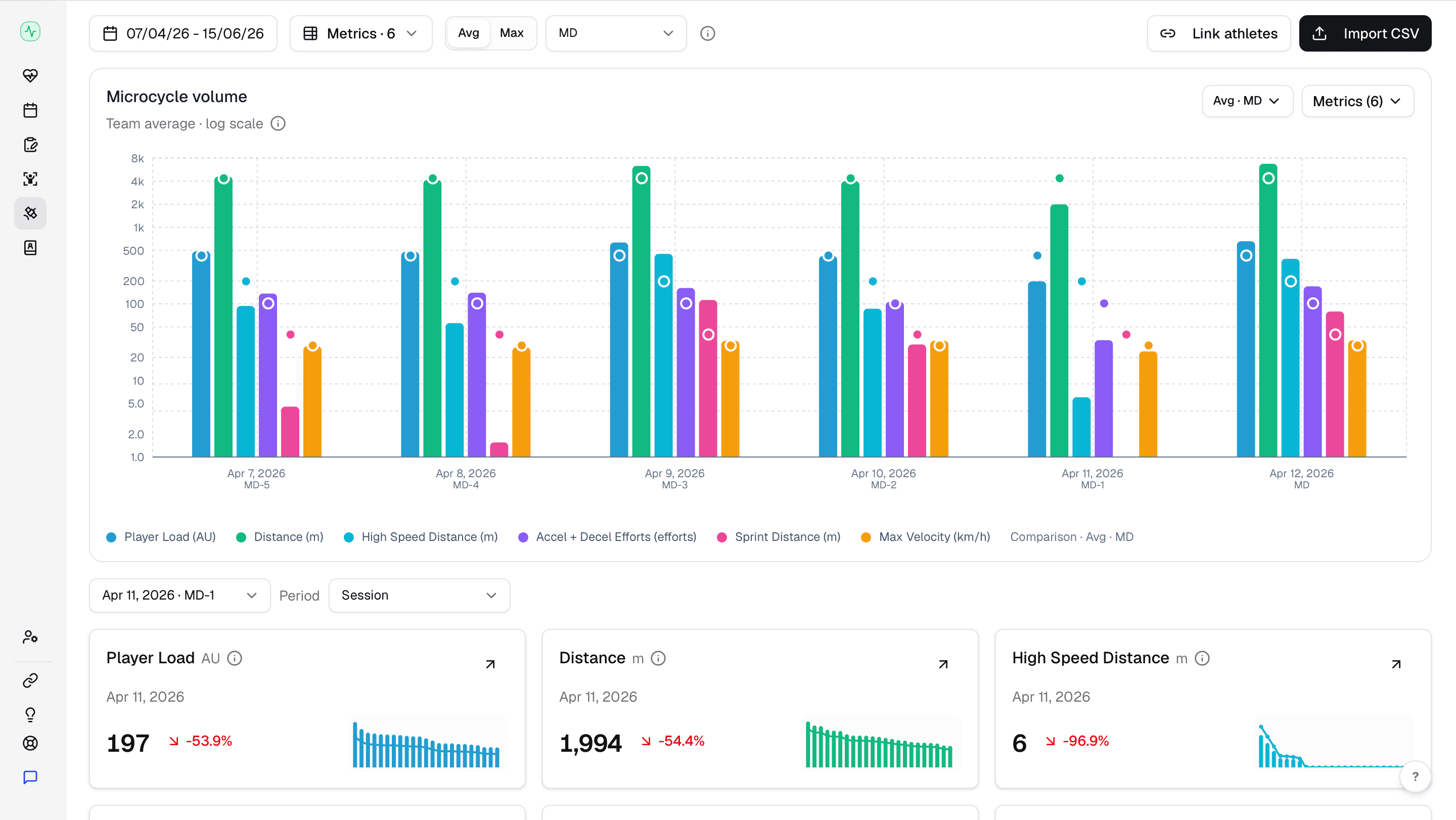
Catapult, STATSports, Oliver Sports, WIMU and Vert each have a parser that knows their export layout, so those files need nothing from you. Every other provider runs through the same import screen, where you pick which Fractall field each column feeds and set the delimiter and decimal format. Rows get matched to your roster and the metrics store against the right session, so GPS sits under the same athlete, date and tag filters as your sRPE and wellness data instead of in a separate platform.
Five providers read on upload
Catapult, STATSports, Oliver Sports and WIMU as CSV, and Vert as SportsCode XML, each with its own parser.
Every other provider
Map each column to a Fractall field in the import screen and ignore the ones you don't need.
Import profiles
Fractall fingerprints the file's headers and saves your team's column mapping, delimiter and decimal format. The next export from that setup needs no mapping.
More than 70 metrics
Player load, distance, high speed distance, accelerations, sprint distance and max velocity by default, with velocity bands and metabolic measures available.
Your own metric sets
Save a named set of metrics and those become the cards on your GPS dashboard.
Match day classification
Sessions get labelled relative to match day, which drives the benchmark comparisons.
Catapult, STATSports, Oliver Sports and WIMU CSVs are read on upload. So is Vert's SportsCode XML, which carries jump data for volleyball. Any other provider that exports a CSV goes through the import screen once, where you point each column at a Fractall field. That mapping saves against the file's headers, so every later export from the same system loads without touching it.
Read on upload
Catapult, STATSports, Oliver Sports, WIMU and Vert each have a parser that knows their file layout.
Vert for volleyball
Jump count, jump height, landing stress and jump power per athlete, from the XML that SportsCode exports.
Mapped once, then automatic
Every other brand takes one pass through the import screen and the layout is saved for that team.
CSV is the only requirement
If your provider exports a CSV, it imports, listed here or not.
File import covers GPS today, whichever brand the vests are. What follows is a direct connection to each of these, so the data arrives without anyone exporting a file. None of it is built yet, so read the list as intent rather than a spec.
The data sits across a GPS platform, a force plate app, a wearable dashboard and a spreadsheet, which means cross referencing four platforms before a Tuesday session. That doesn't happen in a normal week, so most of it goes unread.
One platform
Load, wellness, tests and GPS against one profile.
Fewer manual steps
Saved import profiles remove the remapping. Direct connections would remove the upload.
The views you already read
New sources appear in the dashboards your staff use now.
Tell us what you already have in the building and it moves up the list.
