1 Month Free Access (cancel anytime)

Every category scored from 0 to 100, a radar per team and per athlete, and the names ranked under each category. Open it after a testing day and you can see where the squad stands before anyone opens a spreadsheet.
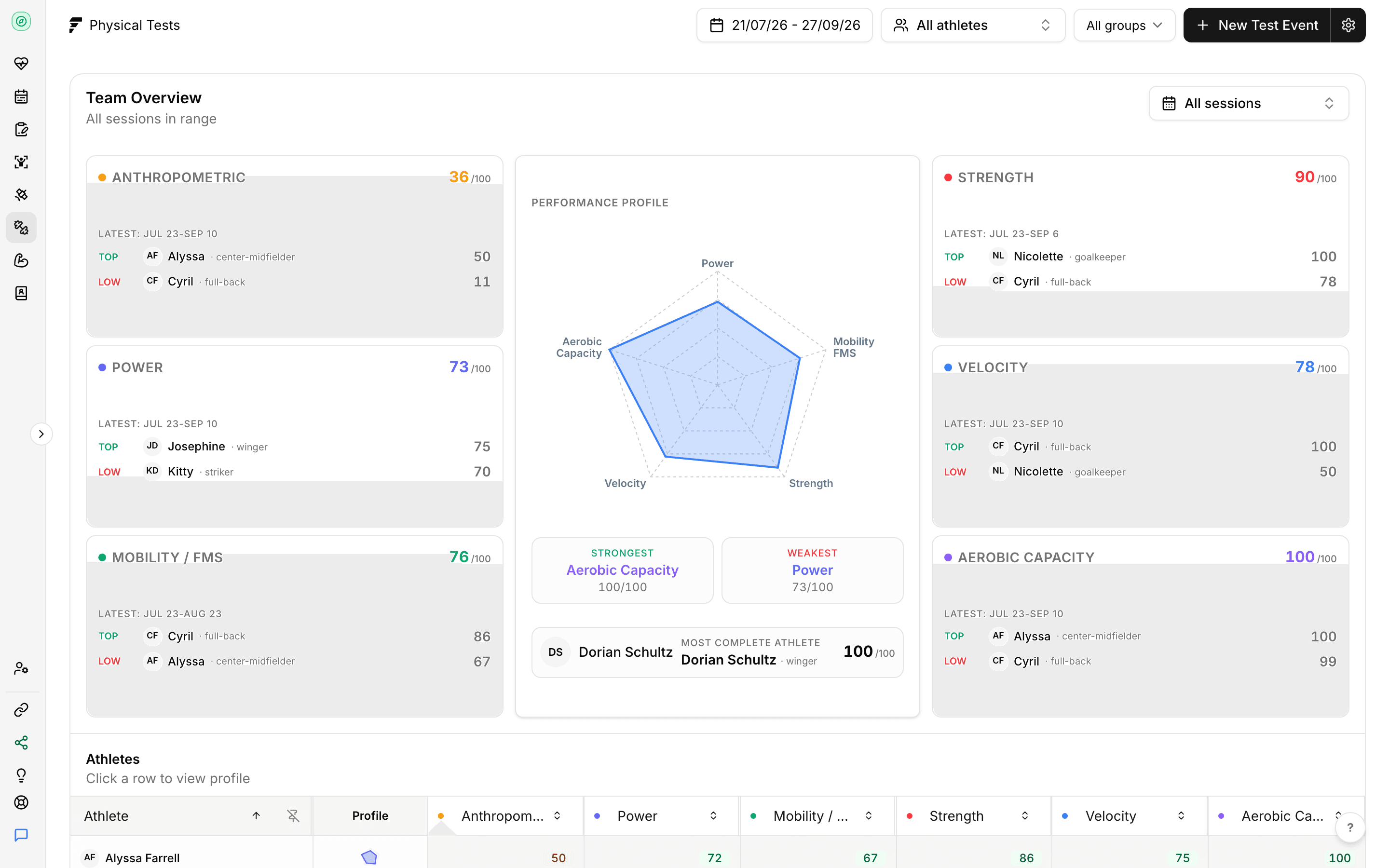
Anthropometric, power, strength, speed, mobility and aerobic. Each raw result is normalised against that metric's reference range, so a 2.8 second sprint and a 42cm jump end up on the same 0 to 100 scale and can sit in one view. Anthropometric stays descriptive and is left out of the performance radar, because height and body mass aren't things an athlete scores well or badly at.
Scored against reference bands
Power, strength, speed and aerobic score 0 at the Average band for the athlete's sex and 100 at Excellent. Mobility and anthropometric use one fixed range for both sexes.
Five performance categories on the radar
Power, strength, speed, mobility and aerobic. Anthropometric is descriptive and sits outside it.
Team and athlete side by side
The same radar renders for a squad average or a single athlete against it.
Benchmarks your team can edit
Two defaults ship, Fractall global (male) and Fractall global (female). In settings, each team can change its own Excellent, Good and Average bands per sex, test by test, for power, strength, speed and aerobic.
Every category card ranks the athletes scored in it, so the names you need are on the screen rather than three clicks into a table. The overview also surfaces the athlete with the most complete profile, which is usually the one worth reading first because there's the least missing behind the number.
Ranked per category
Top and bottom names under each category, with the score next to them.
Most complete profile
The athlete with the fewest gaps across categories, surfaced on the overview.
Straight into the detail
Each category card opens its own page with every metric and athlete in it.
Filter by date range, by testing session or by athlete, and every card follows. Where an athlete has no result for a category the radar leaves the gap open instead of drawing a zero, so a hole in your testing calendar never looks like a weakness in the squad.
Date range, session and athlete
One set of filters across the cards, radar and table.
Gaps stay gaps
An untested category is drawn as missing rather than scored as zero.
Sex specific norms
Athletes without male or female recorded on their profile are left out of physical testing, because the bands differ by sex.
Start a free trial, enter a session for the squad and read the overview the same afternoon.
For the overview, pricing and FAQ, see physical tests for coaches
