
Your GPS data, in the same place as your RPE and wellness.
Import the CSV export from your GPS provider and Fractall charts distance, high-speed running, sprint distance, accelerations and max velocity for every athlete. Compared across the microcycle, matchday by matchday. Sitting beside the internal load you already track.
No credit card required - Cancel anytime
Trusted by 256 coaches across 138 clubs
Trusted by clubs across Europe and Africa































What is GPS and external load monitoring in Fractall?
Fractall imports the CSV export from your GPS provider and charts distance, high-speed running, sprint distance, accelerations and max velocity for every athlete, matchday by matchday, next to the session RPE and wellness you already track.
Six external load metrics, straight from your export.
Fractall reads the metrics your GPS provider already records and charts them as session KPIs and microcycle comparisons, without anyone re-typing a row.
Distance
mTotal volume covered in the session. The baseline every other metric gets read against.
High speed distance
mMetres above your high-speed threshold, and the metric most closely watched for hamstring exposure.
Sprint distance
mThe sharpest end of the running profile, usually the first thing to drop when an athlete is carrying fatigue.
Accel + decel efforts
effortsThe count of accelerations and decelerations. Mechanical load that distance alone hides.
Max velocity
km/hTop speed reached, useful as a readiness check and as a sprint exposure target.
Player load
AUThe accelerometer-based load figure from your provider, tracked session to session.
Metric availability depends on what your GPS provider exports.
Most clubs with GPS units still can't answer simple questions with the data.
The units are on the athletes. The insight rarely makes it to the coach who plans the week.
The data stays in the provider's portal
You bought the units. The export sits in a separate dashboard that one staff member opens on a Monday, and nobody else in the building sees it.
External and internal load never meet
GPS in one tool, RPE and wellness in another. So the question that matters, whether the running load matches what the athlete says their body is doing, never gets asked.
Merging them costs enterprise money
Platforms that bring both together charge EUR200-500 a month. Clubs your size go without and keep the two data sets in separate spreadsheets.
Export the session from your GPS provider
Run your normal post-session export. Fractall already reads Catapult, Oliver Sports, STATSports and WIMU CSVs and Vert's SportsCode XML, so nothing changes about how you collect the data on the pitch.
Import the CSV and link your athletes
Drop the file into the GPS tab and map the athlete names in your export to your Fractall squad. Done once, then your imports line up with the rest of the athlete's record.

Compare the microcycle, matchday by matchday
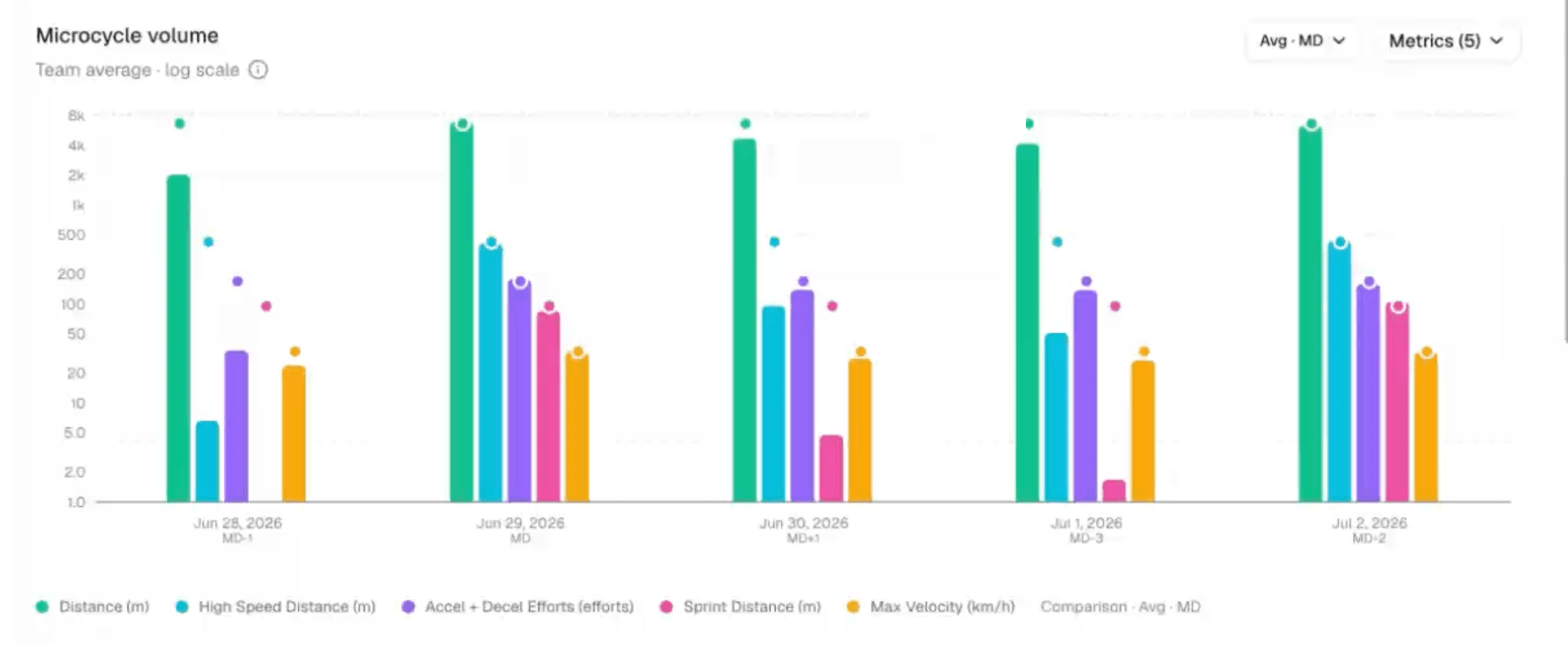
Sessions are labelled MD-3, MD-1, MD, MD+1 and charted together, so you can see how this week's build compares to the last one. Switch between team average and squad max, and pick the metrics you care about.
Read the session KPIs and where they're heading
Player load, distance and high speed distance for the session you picked, each with the change against the previous period and a sparkline of the recent trend. The same platform holds session RPE, ACWR, wellness and body pain, so you read the running load and the RPE for one session on one screen.

Squad view
External load for the whole squad, session by session.
Want to try CSV mapping first? Free GPS import
What you get
Session KPIs with trend
Player load, distance and high speed distance for the selected session, each with the change against the previous period and a sparkline of where it's been heading.
Matchday-relative comparison
Sessions plot against their position in the week rather than the calendar date. MD-1 this week lines up against MD-1 last week.
Team average or squad max
One toggle switches the whole view between the team's average output and the highest individual figures.
Pick your metrics
Choose which of the six metrics appear on the chart. Coaches who care about accelerations and coaches who care about sprint distance get different views of the same import.
Any date range, any period
Filter by date range and read load at session level or across the microcycle.
Works with the units you already own
Fractall doesn't sell hardware and doesn't lock you to a provider. Catapult, Oliver Sports, STATSports, WIMU and Vert exports are handled already, anything else goes through manual mapping, and we'll automate yours if you ask. If you don't run GPS at all, internal load works on its own.
External load sits alongside RPE monitoring and ACWR. See it live on the Fractall coach dashboard ->
Want to map a provider CSV in the browser? Free GPS import →
What coaches say
“For years, I asked for a better way to manage performance. Now, this platform saves me hours every week.”

Guy Sauce
Head of Performance · Sport Clube Beira-Mar
“Before training, it is immediately clear which players need to be managed differently that day.”

Jose Dias
S&C Coach · Sport Clube Beira-Mar
“Understanding how athletes perceive workload is crucial when adjusting training stimuli to readiness state.”

Telmo Antonio
S&C Coach · JuveForce ADC
All testimonials used with permission.
GPS analysis included. No separate module fee.
Enterprise tools charge EUR200-500/month. Fractall starts at EUR20.
Per team - Monthly billing
$18.63/month billed annually · Less than $0.78/day per team
- ✓GPS CSV import
- ✓Six external load metrics
- ✓Microcycle comparison by matchday
- ✓Session KPIs and trends
- ✓Unlimited athletes per team
- ✓Unlimited coaches and staff
- ✓Session RPE and ACWR
- ✓Wellness and body pain mapping
- ✓PDF report export
- ✓1-month free trial
- ✓No credit card required
Multi-team discounts available - See full pricing ->
Common questions
Which GPS providers can I import from?+
Catapult, Oliver Sports, STATSports and WIMU CSVs are supported today, and so is Vert's SportsCode XML, which brings in jump data for volleyball. Other providers work as well, through manual mapping when you bring the file in. Every one of them is a file import, and there's no direct connection to a provider's API yet. If you'd rather have your provider's export handled automatically, talk to us and we'll look at building it for you. Send us a sample file if you want us to check yours first.
Do I need GPS units to use Fractall?+
No. Fractall's load monitoring runs on session RPE multiplied by duration, so a club with no hardware gets ACWR, monotony and strain from day one. GPS adds external load on top of that.
Which metrics does Fractall show?+
Distance, high speed distance, sprint distance, accelerations and decelerations, max velocity, and player load. What's available in your view depends on which of these your provider exports.
How do I get my GPS data into Fractall?+
Export the session as a CSV from your provider, open the GPS tab, and import the file. The first time, you link the athlete names in the export to your Fractall squad.
Can I compare GPS load against RPE and wellness?+
Yes. Both sit in the same platform against the same athletes and the same sessions, so you can check whether a heavy running week matches what athletes report in their daily check-in.
Does GPS cost extra?+
No. It's part of the EUR20 per team per month plan, along with every other module.
Prefer to read this in Portuguese? Monitorizacao de GPS e Carga Externa ->
Stop opening two dashboards to answer one question.
Bring your GPS exports into the platform that already holds your RPE, wellness and ACWR. Your first month is free, with no credit card and no setup call.