
Know your squad's ACWR before every session.
Fractall calculates the acute:chronic workload ratio for every athlete automatically - from sRPE, no GPS required. Red flags appear on your dashboard before the next session. Stop injury before it happens.
No credit card required - Cancel anytime
Trusted by 276 coaches across 160 clubs
Trusted by clubs on four continents
































What is the acute:chronic workload ratio?
ACWR divides an athlete's last 7 days of training load by their 4-week rolling average. Gabbett's 2016 research puts the sweet spot at 0.8 to 1.3, with injury risk climbing above 1.5. Fractall calculates it for every athlete from sRPE alone, session by session, so you don't rebuild the formula in a spreadsheet each week.
What does ACWR actually tell you?
ACWR divides the last 7 days of training load (acute) by the 4-week rolling average (chronic). The result tells you how hard your athletes are training relative to what their bodies are prepared for.
< 0.8
Undertraining
Acute load is too low relative to fitness base. The athlete is deconditioned - risk of re-injury when load increases suddenly.
0.8 - 1.3
Sweet spot
Optimal training zone. Acute load is building fitness without exceeding recovery capacity. Target for most training weeks.
1.3 - 1.5
Caution zone
Load is running ahead of fitness base. Monitor closely, adjust session intensity or volume, and check wellness data.
> 1.5
Danger zone
Research links this range to a significant spike in injury risk (Gabbett, 2016). Reduce load or rest the athlete immediately.
Based on Gabbett TJ (2016). The training-injury prevention paradox. British Journal of Sports Medicine.
Calculate ACWR for your whole squad
Download the sheet, fill in each athlete's daily load, upload it back. You get an ACWR for every player, with both calculation methods and the same maths Fractall runs on live squads. Daily load is session RPE (1-10) multiplied by minutes.
Download the sheet
One row per day for the last 28 days, one column per athlete. Add a column for every player you monitor.
Fill it in
Daily load = RPE x minutes. Leave rest days empty. Or skip the file and type straight into the grid below.
Upload it back
Drop the filled file here and every athlete gets a ratio. The maths runs in your browser and nothing is sent to us.
CSV or Excel-exported CSV. Drop it here or click to choose a file.
Calculation method
Weights recent days more heavily, with a 7-day acute and 21-day chronic window. It reacts faster to a sudden spike (Murray et al., 2017), and it is what Fractall shows by default.
Last 28 days
Type the load, or type it as 7x60 and we do the multiplication. An empty cell counts as a rest day.
| Date | |||||
|---|---|---|---|---|---|
| day 1 | |||||
| day 2 | |||||
| day 3 | |||||
| day 4 | |||||
| day 5 | |||||
| day 6 | |||||
| day 7 | |||||
| day 8 | |||||
| day 9 | |||||
| day 10 | |||||
| day 11 | |||||
| day 12 | |||||
| day 13 | |||||
| day 14 | |||||
| day 15 | |||||
| day 16 | |||||
| day 17 | |||||
| day 18 | |||||
| day 19 | |||||
| day 20 | |||||
| day 21 | |||||
| day 22 | |||||
| day 23 | |||||
| day 24 | |||||
| day 25 | |||||
| day 26 | |||||
| day 27 | |||||
| day 28Today |
Copy a block of cells from your spreadsheet and paste it anywhere in the grid. It fills down and across from there.
Your squad, ranked by ratio
Highest ratio at the top, so the athletes worth a conversation are the ones you read first.
| Athlete | ACWREWMA | Zone | Acute load | Chronic load | Last 7 days | Monotony | Strain | Days of data |
|---|---|---|---|---|---|---|---|---|
| Kwame MensahBack from a layoff | 1.56 | Danger zone | 431 | 277 | 3,200 | 2.28 | 1,403 | 28/28 |
| Tiago NunesCongested fixtures | 1.24 | Sweet spot | 480 | 388 | 3,720 | 2.18 | 1,710 | 28/28 |
| Marta SilvaSteady build | 1.05 | Sweet spot | 335 | 320 | 2,240 | 1.47 | 1,524 | 28/28 |
| Lena BrandtLight week | 0.68 | Undertraining | 199 | 292 | 1,140 | 1.14 | 1,000 | 28/28 |
AU = arbitrary units. Acute and chronic are averages per day, the last 7 days column is the week's total.
Monotony is the week's average load divided by its standard deviation. Above 2.0 means every day looked the same, which carries its own risk. Strain multiplies monotony by the weekly load.
Fractall hides an athlete's ratio until they have 21 days of history, because a short history shrinks the chronic average and pushes the ratio up for no good reason. Here you see it either way, flagged when the history is thin.
Fractall runs this for your whole squad after every session, with no spreadsheet to keep up to date.
Your squad data stays in this browser tab. Nothing is uploaded, nothing is stored. This number is a screening flag, not a diagnosis. Read the caveats below before acting on it.
What ACWR can't tell you
ACWR is useful and popular. It's also contested in the research, and coaches deserve to know both sides before building decisions on one number.
A flag to investigate, not a prediction
The studies behind ACWR show association at squad level. Researchers have since argued the data can't support causal claims for an individual athlete (Impellizzeri et al., 2020). A spike means look closer at that athlete today. It doesn't mean an injury is coming.
Why EWMA is the default here
The rolling average treats a session 27 days ago the same as yesterday's. EWMA weights recent days more heavily, and picked up injury risk at high ratios that rolling averages missed (Murray et al., 2017; method from Williams et al., 2017). Fractall calculates both versions for every athlete.
Check wellness before you act on a spike
A ratio of 1.4 in a rested athlete who slept well is a different situation from 1.4 with three days of poor sleep and heavy soreness. Fractall puts wellness answers next to the load data so the number gets its context.
Internal and external load answer different questions
sRPE measures how hard the session felt to the athlete. GPS measures the work they actually did: distance, sprints, high-speed running. When both are available, read them together - a high sRPE on a day of ordinary GPS output means the session cost the athlete more than the work suggests, and that gap is worth a conversation. Fractall imports GPS data from any provider alongside sRPE.
See GPS tracking in Fractall ->
Sources
- Williams S et al. (2017). Better way to determine the acute:chronic workload ratio? British Journal of Sports Medicine.
- Murray NB et al. (2017). Calculating acute:chronic workload ratios using exponentially weighted moving averages provides a more sensitive indicator of injury likelihood than rolling averages. British Journal of Sports Medicine.
- Impellizzeri FM et al. (2020). Acute:Chronic Workload Ratio: Conceptual Issues and Fundamental Pitfalls. International Journal of Sports Physiology and Performance.
Sound familiar?
Most coaches know ACWR matters. Few have a reliable way to track it.
You're calculating it by hand
ACWR requires 28 days of rolling load data per athlete, recalculated after every session. Most coaches either skip it entirely or maintain a spreadsheet that takes hours to maintain.
You find out after the injury
Without a live ACWR view, overload is invisible until the athlete breaks down. The spike was there. You just couldn't see it.
Enterprise platforms are unaffordable
The tools that automate ACWR well charge EUR200-500/month. Most clubs your size go without - and absorb the injury costs instead.
How it works
Setup in under 15 minutes. ACWR data from your first session.
Schedule your sessions
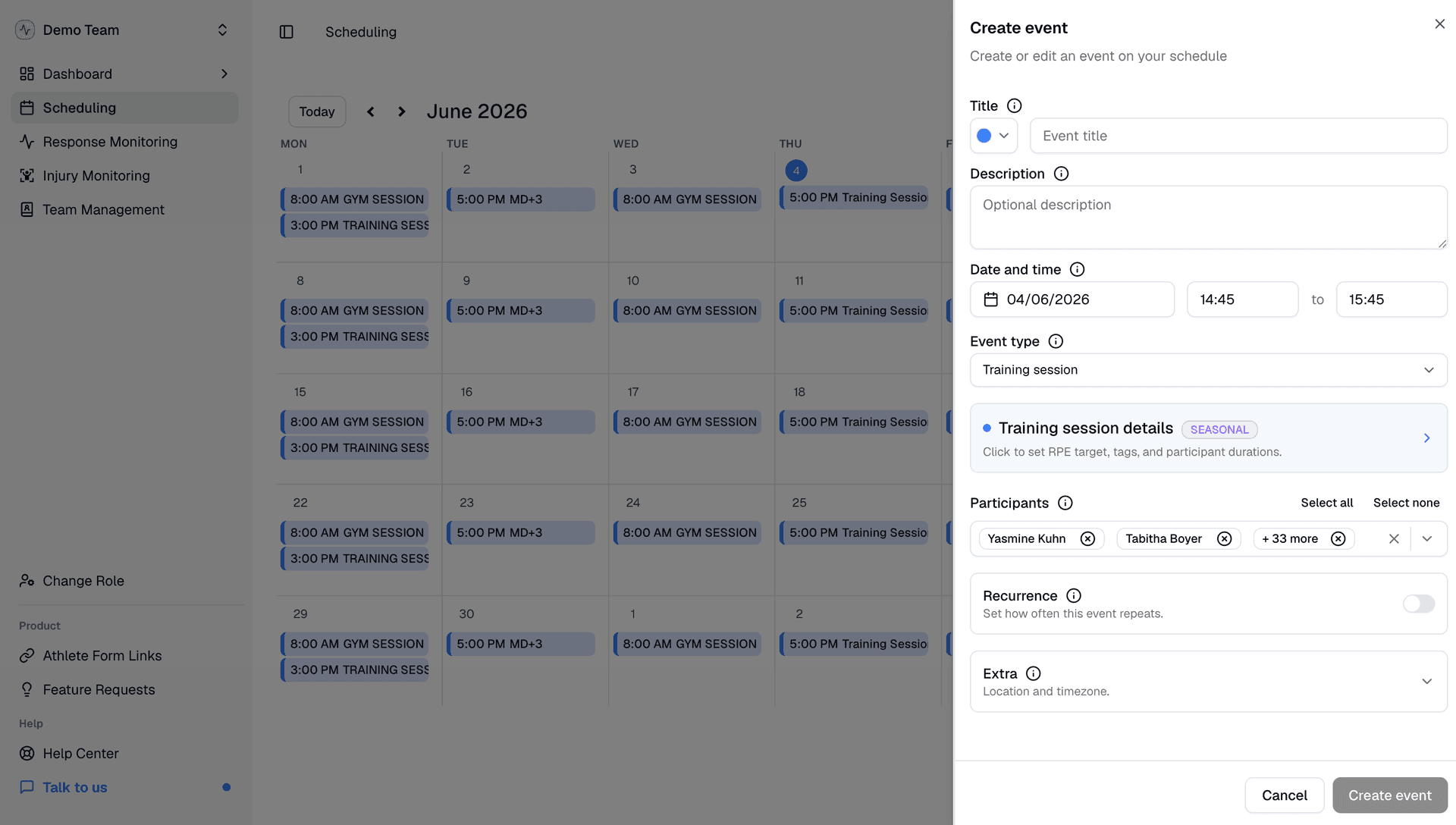
Set session duration, type, and participants. Alt+drag copies a session to any other day of the season. Athletes get a reminder to rate it 20 minutes after it ends.
Athletes submit sRPE in 30 seconds
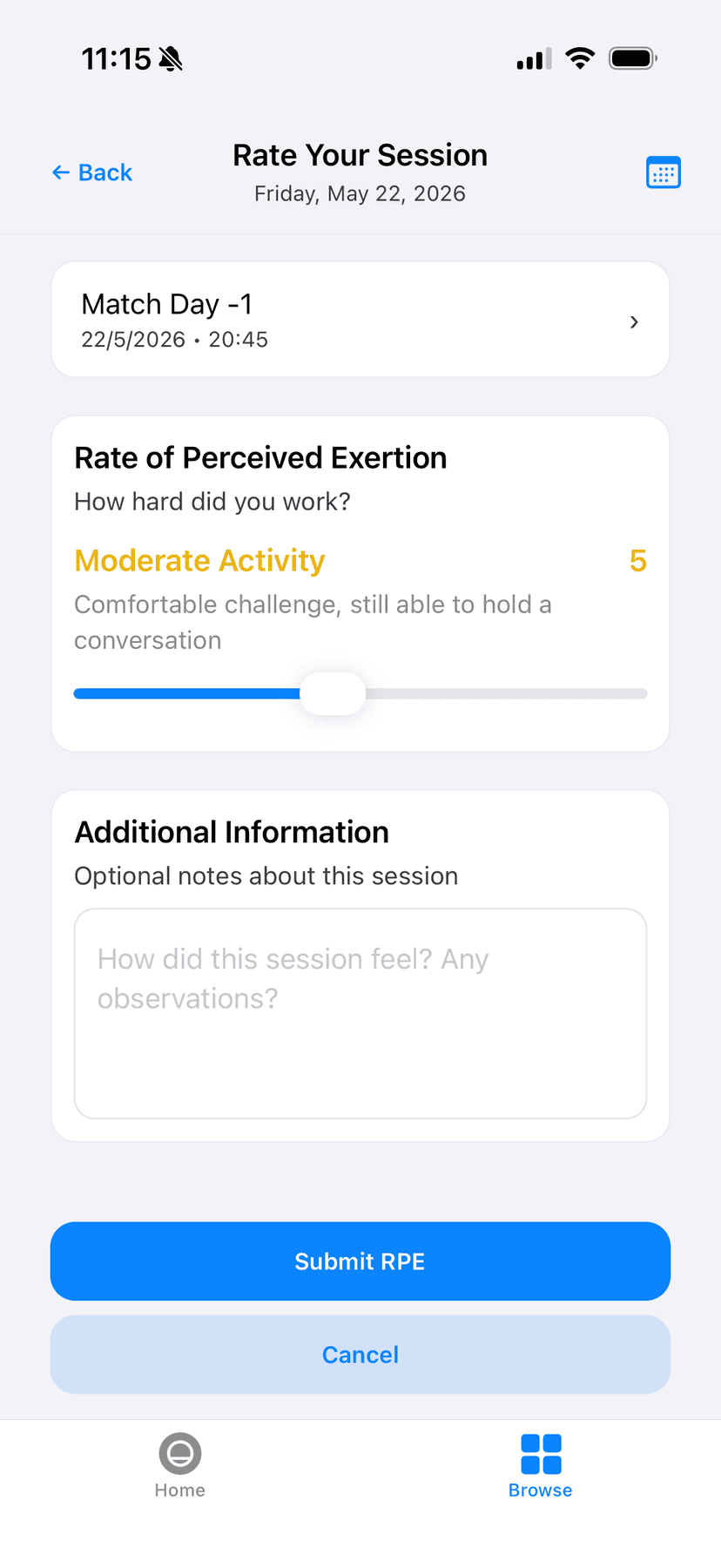
After each session, athletes rate their effort (1-10) via push notification. Session load is calculated as RPE x duration (sRPE method, Foster 1998).
ACWR appears automatically - no formulas
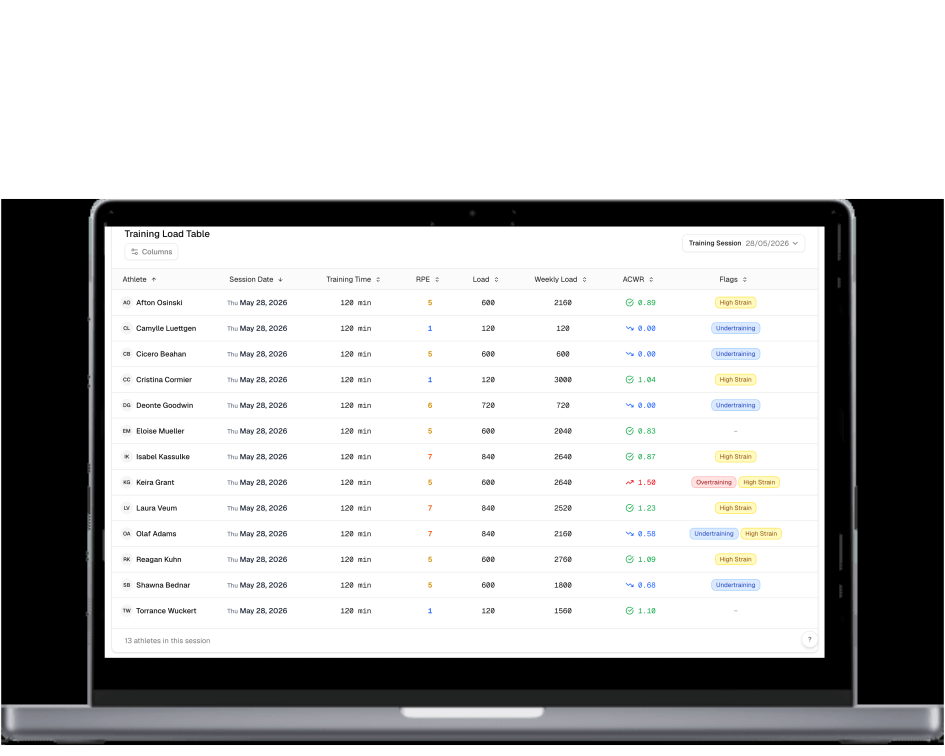
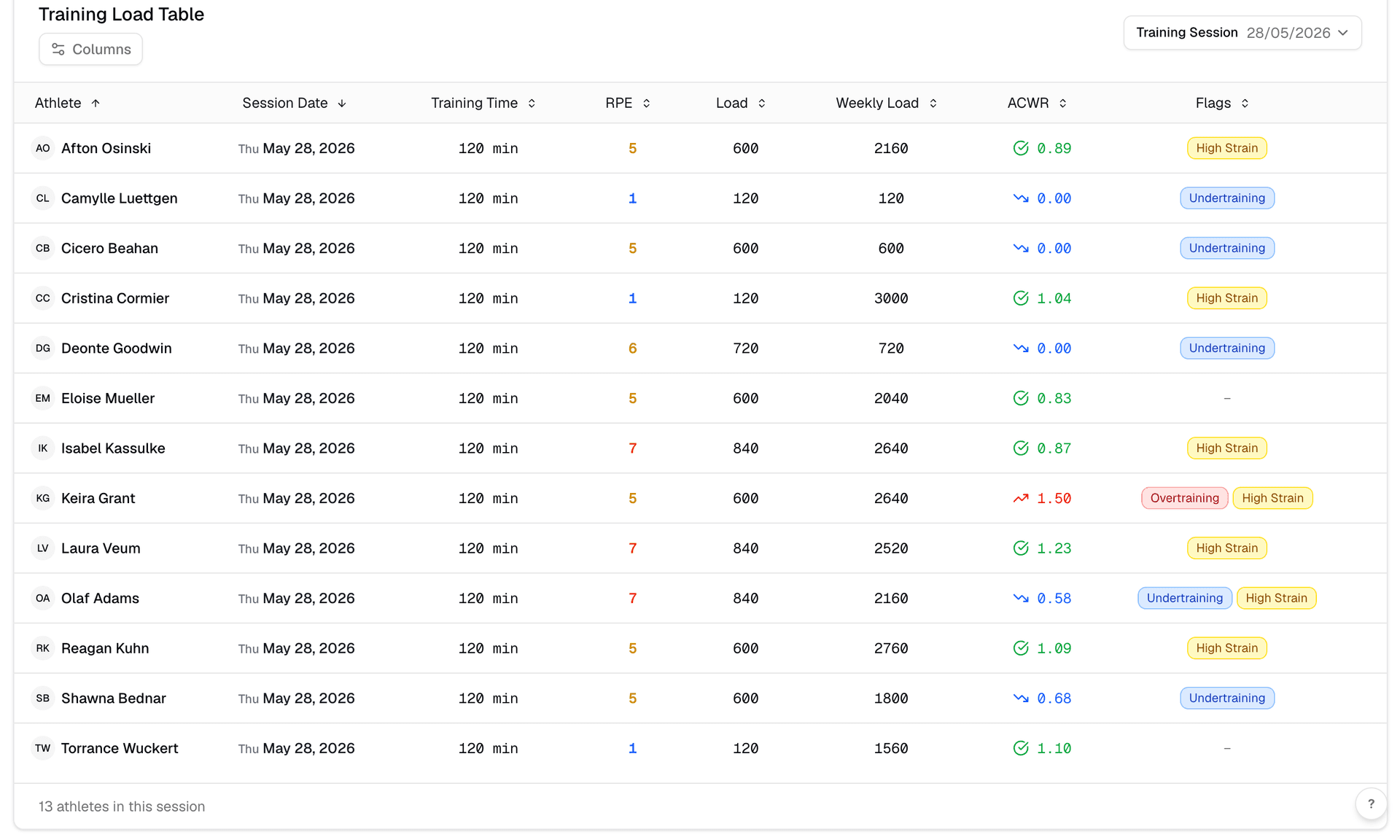
Fractall recalculates each athlete's acute load, chronic load, and ACWR after every session. Red flags appear before the next training starts.
Track load trends over time
See how each athlete's workload has evolved across weeks and training blocks. Spot the pattern before it becomes a problem.
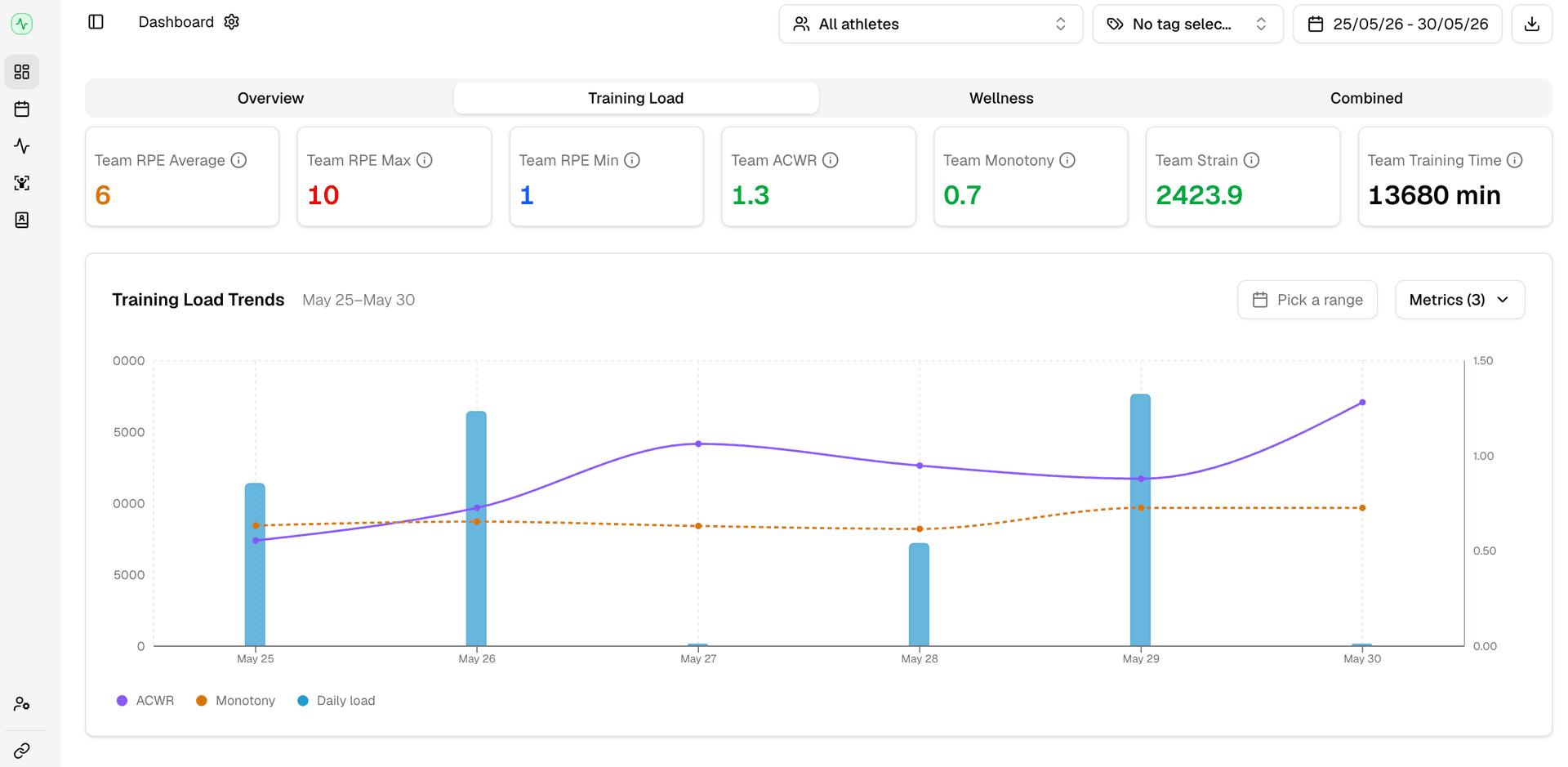
See it in action
ACWR for your whole squad - live, after every session.
Everything you need to manage load safely
ACWR calculated after every session
Acute load, chronic load, and ratio - recalculated automatically as athletes submit sRPE. No formulas, no pivot tables.
Red flags before the next training
When ACWR crosses dangerous thresholds, your dashboard shows it. Intervene with data before the session starts.
Monotony and strain metrics included
ACWR alone doesn't catch everything. Fractall also calculates training monotony and strain.
Load trend charts per athlete
Visualize how acute and chronic workload have evolved over time. Spot the spike coming before it arrives.
Wellness gives context to every load spike
An ACWR of 1.4 means something different for a rested athlete vs. one who has poor sleep for days.
No hardware. Validated science.
sRPE-based internal load (Foster 1998) is a practical and proven approach for ACWR in team sports.
ACWR works alongside wellness tracking. Try the free wellness survey demo or try the free training load calculator. See it live on the Fractall coach dashboard ->
What coaches say
“For years, I asked for a better way to manage performance. Now, this platform saves me hours every week.”

Guy Sauce
Head of Performance · Sport Clube Beira-Mar
“Before training, it is immediately clear which players need to be managed differently that day.”

Jose Dias
S&C Coach · Sport Clube Beira-Mar
“Understanding how athletes perceive workload is crucial when adjusting training stimuli to readiness state.”

Telmo Antonio
S&C Coach · JuveForce ADC
All testimonials used with permission.
Professional load management. Fair pricing.
Enterprise tools charge EUR200-500/month. Fractall starts at EUR20.
Base
- Unlimited coaches & athletes
- 1-month free trial
All modules included
- Scheduling + Intelligence
- Athlete app · Load · Wellness · Injuries
- GPS
- Physical tests
- Training plans whiteboard
Pro AI
Next 100 signups promotion
That's $1.20 a day for the whole team.
- Everything in the Base plan
- MCP connector for Claude and ChatGPT
- Ask about squads, load, wellness and injuries in plain language
- You use your own AI subscription, so we never charge for AI usage
Not sure which plan fits your club? Talk it through with us.
Book a meetingCommon questions
What is the Acute:Chronic Workload Ratio (ACWR)?+
ACWR divides acute workload (last 7 days) by chronic workload (4-week rolling average). Research (Gabbett, 2016) identifies 0.8-1.3 as the sweet spot, while values above 1.5 are associated with significantly higher injury risk.
Do I need GPS or wearables to calculate ACWR?+
No. Fractall uses internal training load - RPE multiplied by session duration (sRPE method, Foster 1998). Athletes submit effort in the mobile app and ACWR is calculated automatically.
What is a dangerous ACWR level?+
An ACWR above 1.5 is associated with elevated injury risk. An ACWR below 0.8 can indicate undertraining relative to fitness base.
Should I use EWMA or the rolling average for ACWR?+
EWMA gives more weight to recent sessions and reacts faster to sudden spikes, which made it a more sensitive injury-risk indicator in elite Australian football data (Murray et al., 2017). The rolling average is simpler and matches the original research. Fractall calculates both for every athlete, so you don't have to pick one.
Does a high ACWR mean my athlete will get injured?+
No. The research links load spikes to higher injury risk at group level, and later reviews (Impellizzeri et al., 2020) caution against reading it as a prediction for one athlete. Treat a high ratio as a reason to check that athlete's wellness, recent GPS output, and training context before the next session.
What is training monotony and why does it matter?+
Training monotony measures day-to-day variation in training load. High monotony can raise injury and illness risk independently of ACWR.
Can I monitor ACWR for multiple teams?+
Yes. Fractall is team-count based - add as many teams as you manage and view ACWR for each squad from a single dashboard.
How long does setup take?+
Most clubs are fully set up in under 15 minutes. Create your team, invite athletes, and they can start submitting sRPE the same day.
Prefer to read this in Portuguese? Dashboard ACWR e Monitorizacao de Carga ->
Your squad's ACWR. Visible after every session.
Join the 1,761 athletes already on Fractall. Your first month is free - no credit card, no hardware, no setup call.
No credit card - No hardware - Cancel anytime