



What is Connect to AI?
Use the AI app you already pay for to ask about your Fractall teams, athletes, and monitoring data.
What it is
Connect to AI lets you talk to the AI app you already subscribe to (like Claude or ChatGPT), and have that app look things up in Fractall.fit for you.
You stay in your usual chat. You ask normal questions about your squads, athletes, wellness, load, and sessions. Your AI uses Fractall in the background to fetch the answers from your club data.
Fractall is not selling you a separate AI chat. You use your own AI plan. Fractall only connects so that app can work with your Fractall account.
What you can ask
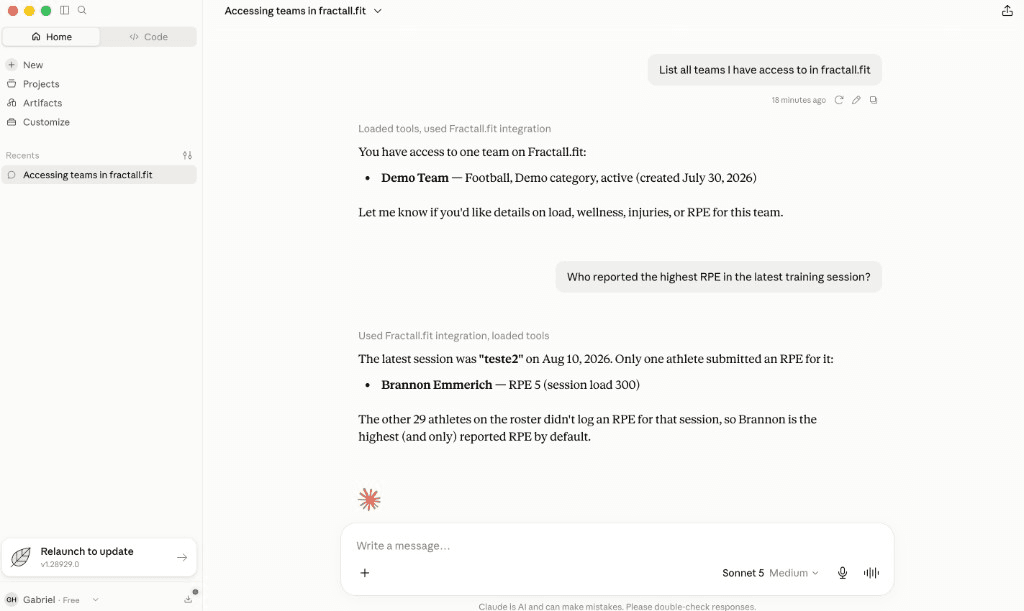
Once connected, try questions like:
- Which teams do I have access to?
- How is wellness looking for the squad this week?
- Who has not submitted RPE?
- Show me recent training sessions for a team
Your AI only sees what your Fractall account can already see. If you cannot open it in Fractall, the AI cannot either.
What you need
- A Fractall account with access to the teams you care about
- An AI app subscription you already use (Claude or ChatGPT)
- A club on the Pro AI plan, which includes the connector
You still pay your own AI provider
Connect to AI comes with the Pro AI plan, at €100 per team per month. Chat usage stays on your Claude or ChatGPT plan, and Fractall never charges for AI usage.
Pick your AI
Choose the guide for the app you use day to day:
Each guide is written for coaches: clicks, screenshots, and a simple check that it worked. No developer setup.
How you know it worked
After you finish the guide for your AI app, ask something simple like:
List all teams I have access to in fractall.fit
If your team names come back, you are connected. Keep asking in plain language from there.
If something fails
Most fixes are a fresh sign-in from the AI app. Open the provider guide again and use the "Sign in again" steps. Still stuck? Contact support and mention Connect to AI.