

Garmin, Apple Watch and Polar Training Load for Team Sports
What Garmin, Apple Watch and Polar training load scores actually measure, why they don't compare across a squad, and how to run one team standard with sRPE.
Published
Quick answer
Garmin, Apple Watch and Polar: three different numbers
Garmin builds its training load from EPOC, Apple multiplies a 1 to 10 effort rating by duration, and Polar's Cardio Load is TRIMP based. The scores sit on different scales and none of them transfers between brands, so a mixed squad can't be monitored through watches. Session RPE gives you one internal load number per player, and it needs no watch at all.
The question players keep asking
The watches already agree on the method
Garmin
What does Garmin's training load actually measure?
Garmin's training load is an estimate of EPOC, excess post-exercise oxygen consumption, modelled from heart rate during the session. Its load ratio divides short-term load by long-term load.
Oxygen debt, modelled from heart rate
A familiar ratio with a private formula
Apple Watch
What does Apple Watch training load measure?
Apple's training load, added in watchOS 11 in 2024, multiplies an effort rating by workout duration, then compares the most recent 7 days against a 28 day weighted average.
An effort rating times minutes
Sounds familiar for a reason
Polar
What do Polar's Cardio Load and Training Load Pro measure?
Polar splits training load into three scores: a TRIMP based Cardio Load from heart rate, a Muscle Load in kilojoules from power data, and a Perceived Load built from the athlete's own 1 to 10 rating times duration.
Three scores, three signals
Polar says the quiet part out loud
The squad problem
Why the numbers won't add up across a squad
Garmin, Apple and Polar training load scores can't be combined or compared, because each brand uses its own input signal and formula, reported on its own scale. A Garmin acute load of 300 and a Polar Cardio Load of 130 describe two different quantities in two different units.
| System | Built from | Comparable across a squad |
|---|---|---|
| Garmin training load | EPOC modelled from heart rate | No. Garmin wearers only. |
| Apple Watch training load | 1 to 10 effort rating × duration, entered by hand for strength | No. Apple Watch wearers only. |
| Polar Training Load Pro | Heart rate TRIMP, plus Muscle Load and an RPE-based Perceived Load | No. Polar wearers only. |
| Session RPE | Athlete's 0 to 10 rating × minutes, gym sessions included | Yes. Every athlete, no device. |
That table is the whole problem in four rows. Even if every score were perfect on its own terms, three practical gaps remain for a coach.
Coverage
Translation
Baselines
The evidence
Where heart rate based load under-reads team sport work
Heart rate based training load struggles with the stop-start shape of team sport. Intermittent exercise disturbs the heart rate relationships that TRIMP style calculations depend on.
What the research found
The expensive work is the invisible work
The team standard
Session RPE: one question, every athlete
Session RPE gives every athlete the same load number regardless of what's on their wrist. Each player rates how hard the session was on a 0 to 10 scale, the rating is multiplied by duration in minutes, and the result is comparable across the squad and across the season.
- 1
Collect one rating per player after every session
Within about 30 minutes of the session ending, gym included. If you're new to the method, start with the basics of session RPE first.
- 2
Multiply rating by minutes for session load
A 7 out of 10 across a 90 minute session is 630 arbitrary units. The unit doesn't matter; the consistency does.
- 3
Sum the week and watch the change
Weekly load against the previous week is the first trend worth reading.
- 4
Track acute against chronic load once four weeks exist
That's ACWR, calculated from data every athlete produces instead of a watch estimate.
- 5
Let the watch stay what it is
Personal context the athlete brings to a conversation, especially around sleep and recovery.
Validated where it matters for you
The answer for the centre back
In Fractall
Running sRPE and ACWR without hardware
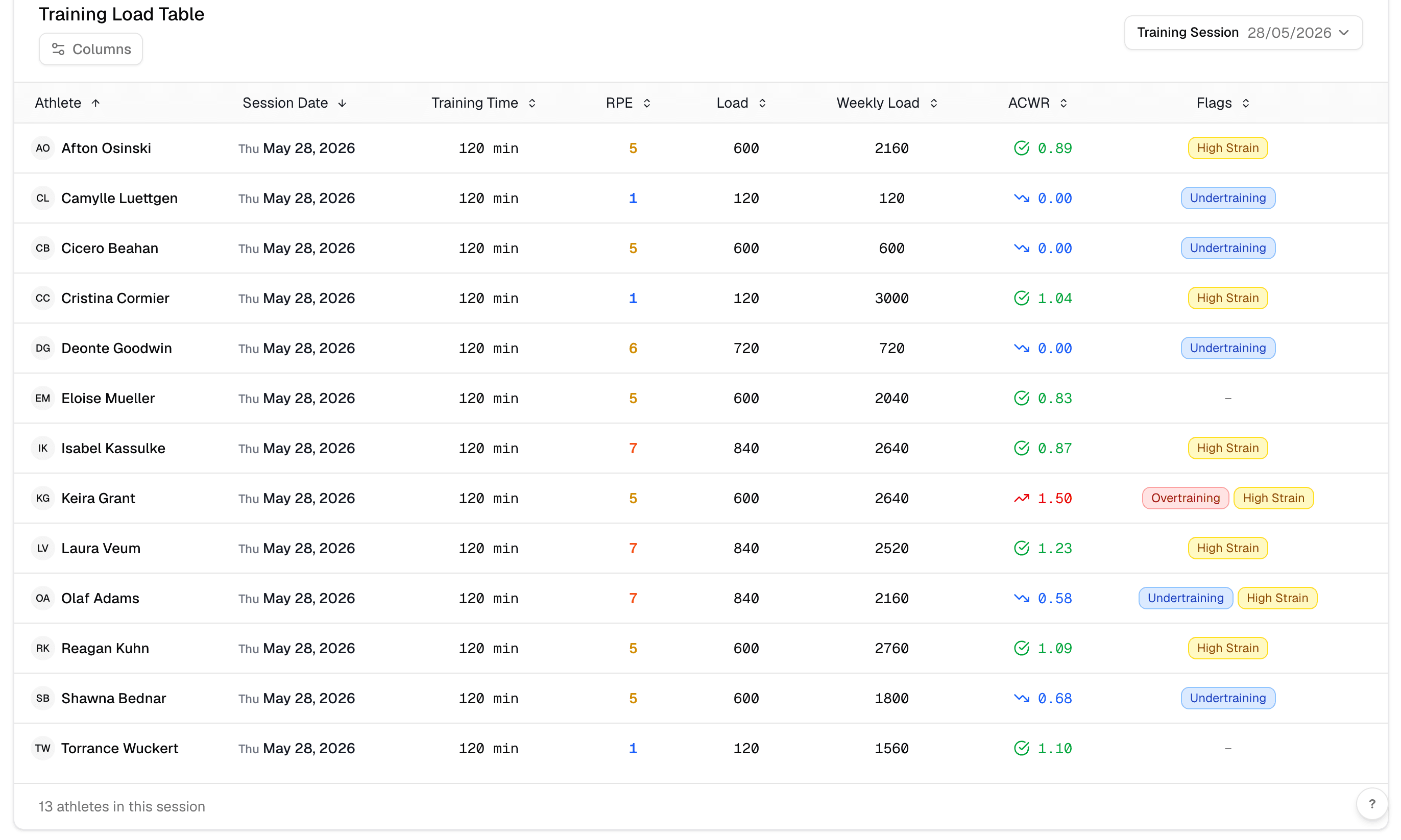
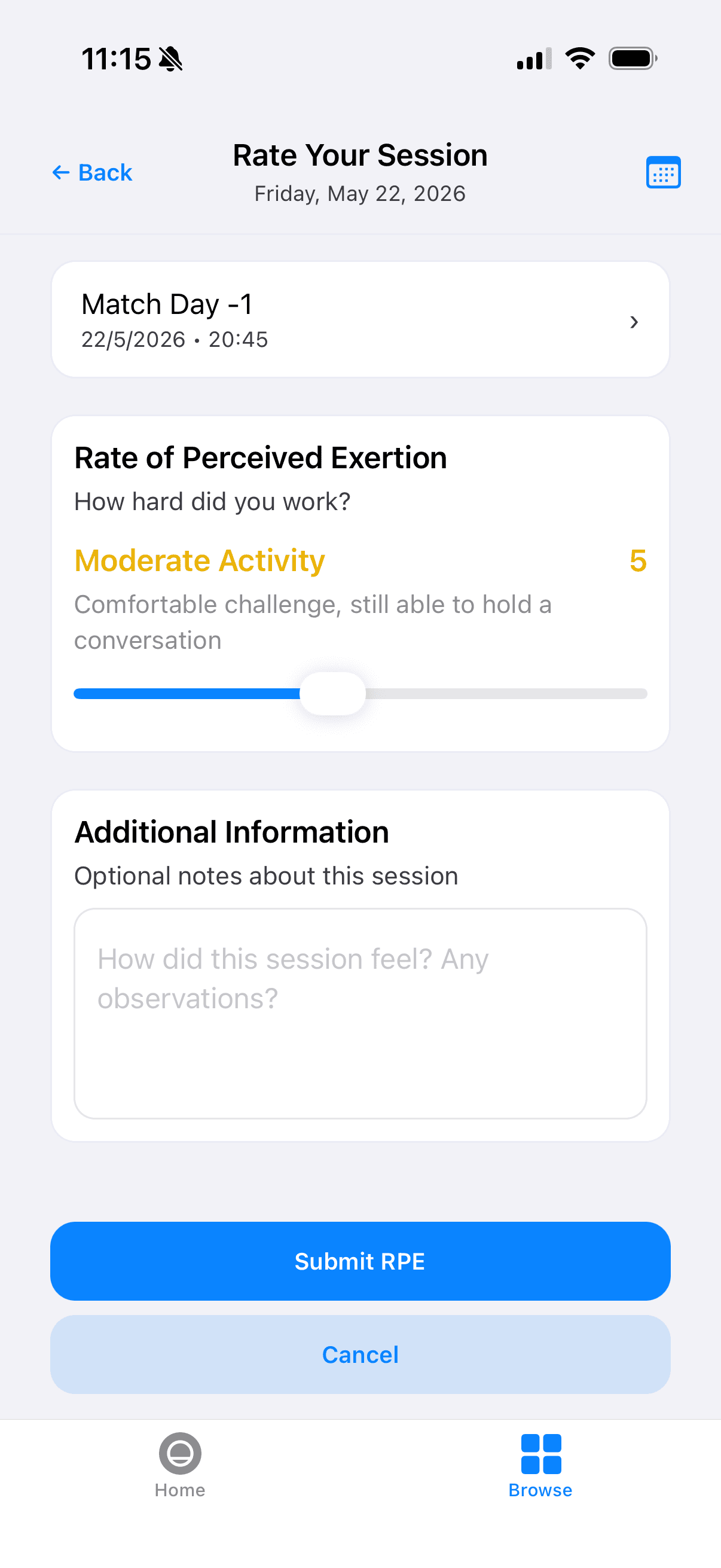
Fractall runs this workflow with no devices at all. Athletes submit their RPE from a phone in the seconds after training, and the coach reads one table instead of eleven watch faces.
From session to squad view
Athletes rate the session on their phone, prompted automatically.
Session load, weekly totals and ACWR are calculated for the whole squad.
Flags surface the outliers so the conversation happens before the injury.
The pieces, if you want to read further
One load number for the whole squad
Whatever's on their wrists. Try Fractall free for your first month, set up in minutes, no hardware required.
FAQs
Wearable training load questions coaches ask
Short answers for staff deciding what to do with the numbers players bring in.
Can I combine Garmin and Apple Watch training load across my squad?
Is Garmin's load ratio the same as ACWR?
Do athletes need a watch for session RPE?
Should I ask players to stop wearing their watches?
Which watch has the most accurate training load?
Related guides
Two Games a Week: What Wellness Data Shows Before Match 2
Fractall data on football teams playing two games a week: on match morning, fatigue sits less than half as far above normal. How to read wellness between games.
ChatGPT and Claude for Strength and Conditioning Coaches
What an S&C coach can ask ChatGPT or Claude about squad load, wellness and injuries, and the privacy settings to change before any athlete data goes in.
CMJ Test: Protocol, Norms and Why Devices Disagree
The same countermovement jump reads nearly 7 cm apart on a force plate, a phone app and a sensor. Triple the U16 to U18 gap. The protocol and the norms.