

1 Month Free Access (cancel anytime)
AI assistantsAthlete monitoringData privacy

ChatGPT and Claude for Strength and Conditioning Coaches

What an S&C coach can ask ChatGPT or Claude about squad load, wellness and injuries, and the privacy settings to change before any athlete data goes in.

Published
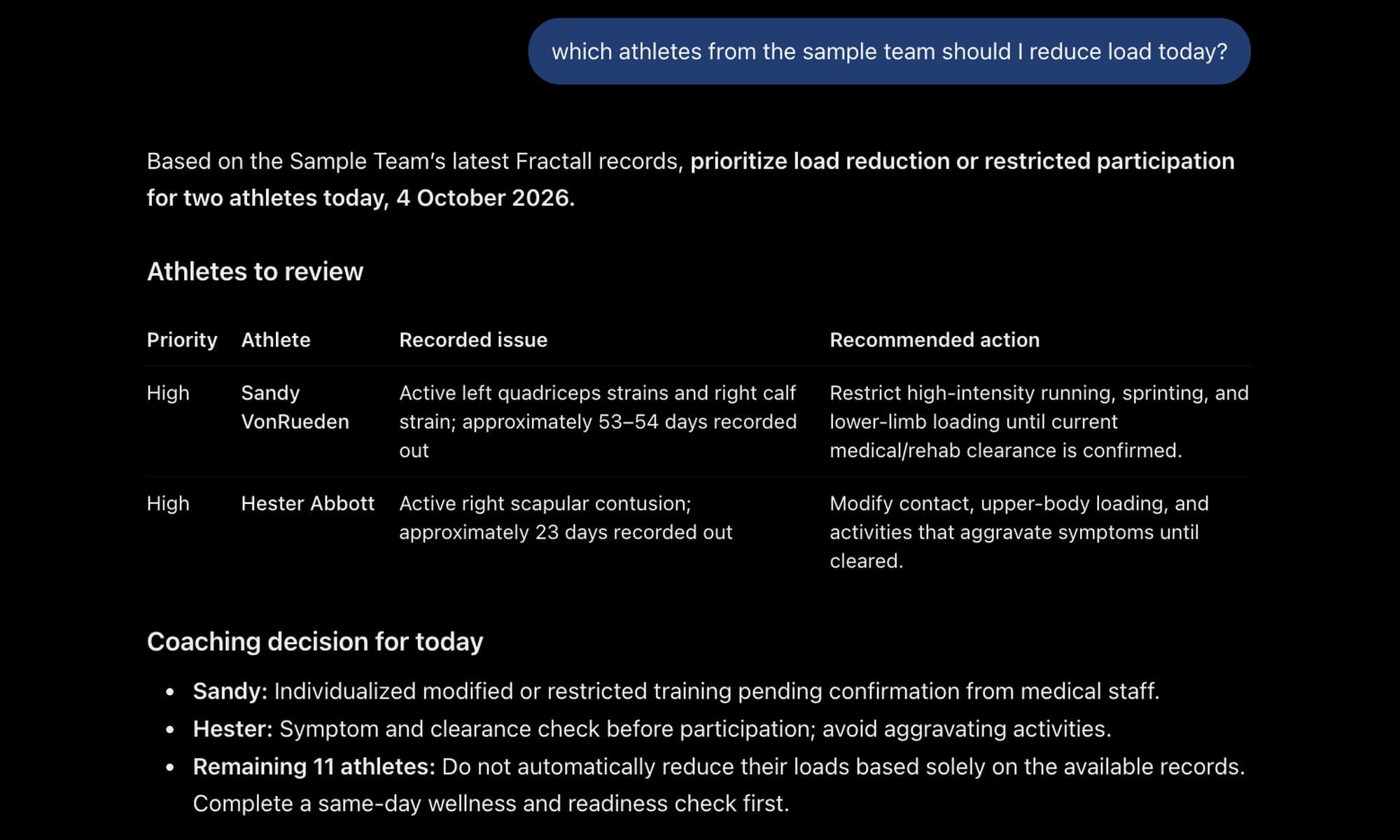
ChatGPT answering which sample team athletes to reduce load for today, with the two injured athletes in a table and a same-day check for the rest of the squad.

Before you paste

1. Without a connection, keep athlete names and health data out of ChatGPT and Claude

Pasting a spreadsheet gets the maths done. It also puts your squad's health data in a chat history you don't control.

Quick answer

ChatGPT and Claude become useful to an S&C coach once they can read the squad's own data, so “who hasn't rated Saturday's match?” gets an answer from real numbers. Before any athlete data goes in, pasted or connected, turn off model training: in ChatGPT that's Settings > Data controls > “Improve the model for everyone”. And keep names, injuries, wellness and cycle data out of anything you paste.
Most “ChatGPT for coaches” guides are prompt lists for session plans and emails. They're useful, and the assistant in them never sees your squad.
We built a read-only connector that lets ChatGPT and Claude read a club's Fractall data, and we asked it the questions S&C coaches ask every week. This guide is that list, in the order of a training week, with the answers it gave on our demo squad.
Below: what to keep out of a chatbot that isn't connected, what changes when it is, the questions day by day, how to read ACWR without overreacting, and how to make the assistant show its working.
Injury records and fitness-tracker data are health data under GDPR, one of the special categories that need extra protection (Article 9). The UK regulator names period data explicitly. Soreness, sleep and mood scores aren't named in anything we found, but they describe an athlete's physical state, so treat them the same way.
Swapping names for numbers doesn't anonymise anything. In a squad of 25 you know who Player 7 is. The ICO's position is that pseudonymised data is still personal data for whoever holds the key, and the coach holds it.
If you paste anything, set these first:
What you wantChatGPTClaude
Stop your chats training the modelSettings > Data controls, turn off "Improve the model for everyone"Settings > Privacy, turn off "Help improve our AI models"
A chat that's never used for trainingTemporary Chat (kept up to 30 days for safety)Incognito chat
Plans that don't train by defaultBusiness, Enterprise, EduTeam, Enterprise
What deleting a chat doesPurged within 30 days; a file saved in Library stays until you delete itRemoved from back-end storage within 30 days
Upload a spreadsheet rather than a screenshot of your dashboard. OpenAI says ChatGPT may not read exact values reliably from image-based tables.

With a connection

2. Connected to Fractall, ChatGPT and Claude read live squad data and change nothing

Read-only access to the data your account already sees, up to 90 days back per question.
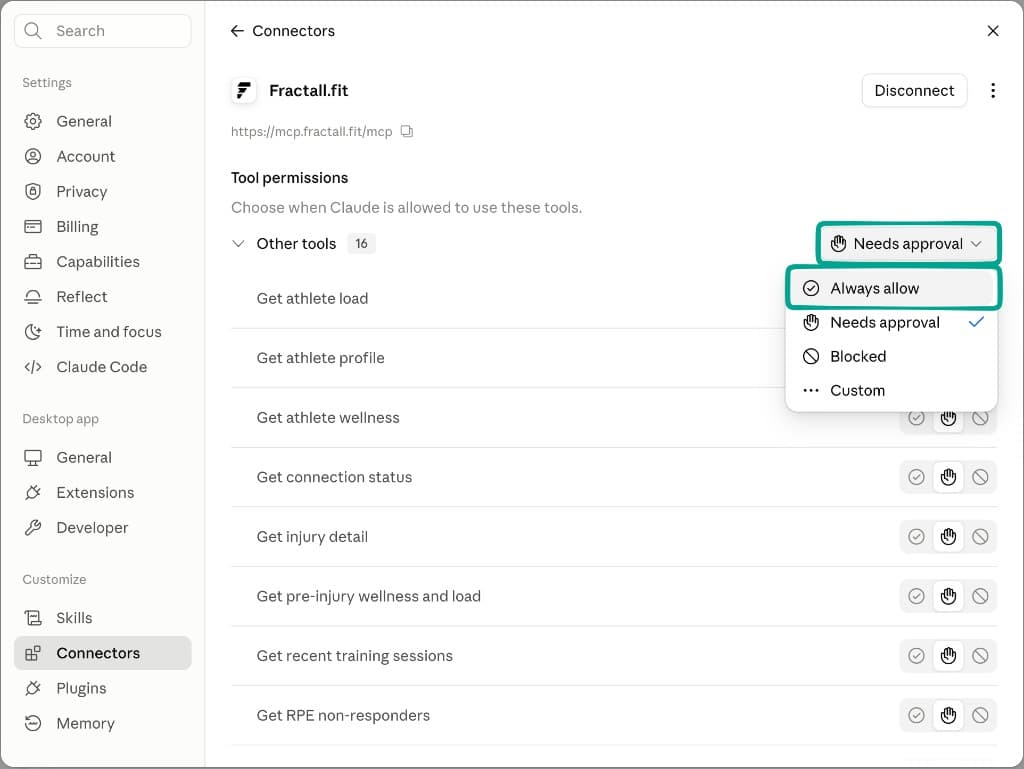
Fractall's connector, in open beta on the Pro AI plan, gives ChatGPT or Claude read-only access to the data your account already sees: rosters, session RPE and training load, wellness check-ins, injuries and GPS. It fetches what each question needs, looks back up to 90 days, and can't add, edit or delete anything.
That removes the stale-copy problem. The privacy settings still matter.
Claude Desktop connector settings for Fractall.fit, listing read tools such as Get athlete load, Get pre-injury wellness and load and Get RPE non-responders.
Every Fractall tool is a read. In Claude's connector settings you also choose whether each one needs your approval first.
On ChatGPT's personal plans, connector data follows the same training setting. OpenAI says that on Free, Plus, Go and Pro it may use information accessed from apps to train its models if “Improve the model for everyone” is on. Turn it off before you connect. On Business, Enterprise and Edu, OpenAI doesn't train on connector data by default.
Anthropic's consumer policy says raw content from connectors and MCP servers isn't included in Claude's training data unless it's copied into the conversation. The conversation itself still follows your “Help improve our AI models” setting (Settings > Privacy), so turn that off as well.
The wellness tools also return menstruation reports from check-ins. If your squad logs cycles, that's the data these settings protect.
The connector works on ChatGPT's free plan and on Claude's free plan. Setup guides: connect ChatGPT, connect Claude. What it covers is on the Fractall in ChatGPT and Fractall in Claude pages.

MD+1

3. The day after the match, ask who didn't report and how the squad pulled up

On MD+1, ask who hasn't submitted RPE before you read any load figure, then how wellness and body pain moved since the match.

The demo squad is Fractall's U-19 football sample team, with generated athlete names. The match is Jornada 1, on 16 August.

Questions to ask

  • Who hasn't submitted RPE for Saturday's match?
  • Show me squad training load for the last 14 days, highest first.
  • How did wellness move since the match, and who reported body pain?

On the demo squad
2 of 13 athletes hadn't rated the match, Tasha Stroman-Jast and Audrey Rowe. Average wellness on the day after was 20.0 out of 25, against 22.3 on match day, and four athletes reported body pain, up from two.
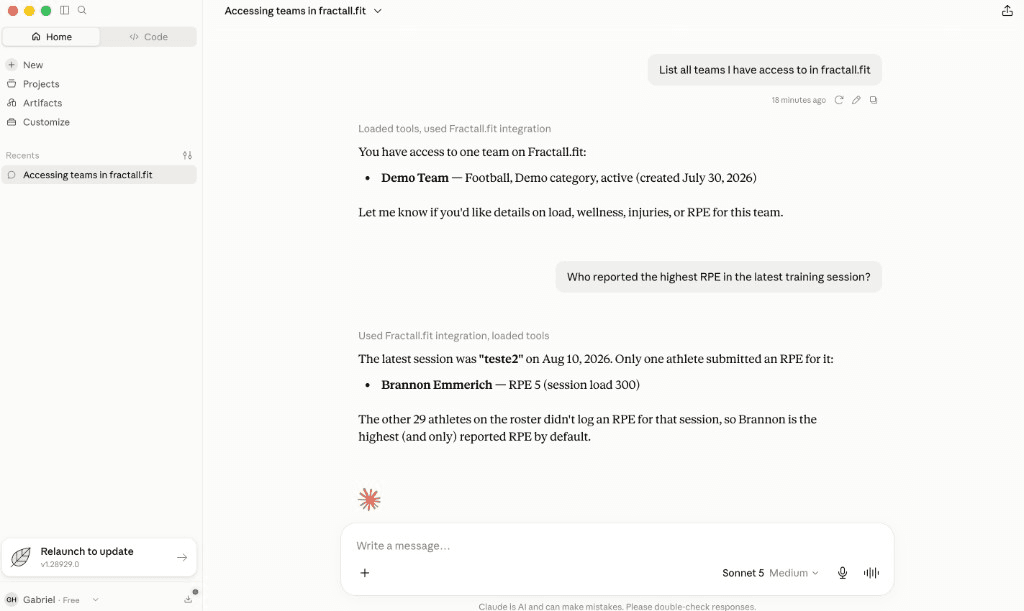
Claude answering who reported the highest RPE in the latest training session, using Fractall data through the connector.
Claude on Fractall's thinner Demo Team: only 1 of 30 athletes had rated the latest session, and it said so instead of naming a top RPE.
Ask the non-responder question first. Any load figure is only as complete as the session RPE behind it, so fill the gaps before you read the rest. Our guide to athlete compliance covers why squads stop answering.

ACWR

4. Use ACWR to decide who to look at, and ask for the EWMA version

A flag to start a conversation, read next to RPE, wellness and pain.

ACWR (acute to chronic workload ratio) compares recent load, usually the last seven days, with longer-term load, usually the last three to four weeks. Gabbett (2016) called 0.8 to 1.3 the “sweet spot” and 1.5 or above the “danger zone”, from cricket, Australian football and rugby league data. Impellizzeri and colleagues (2020) found no evidence supporting ACWR for training recommendations aimed at reducing injury risk, and in 2021 argued for dropping it.

Two rules for the questions you ask

  • Never read it alone. Ask for it next to RPE, wellness and pain reports.
  • Ask for the EWMA (exponentially weighted moving average) version. A rolling average weights every day in the window equally; EWMA gives recent days more weight. Williams and colleagues (2017) proposed it as the better way to calculate the ratio.

Question to ask

  • Who has a high ACWR this week? Show rolling and EWMA side by side, with their RPE and wellness.

On the demo squad

The connector flagged one athlete, Audrey Rowe, at 1.30 on the rolling ratio. The EWMA ratio was 0.99. Audrey was also one of the two who hadn't rated the match, and reported body pain on 15 and 17 August.
One number says look, the other says fine, and the missing match RPE means neither is complete. That's worth a conversation with the athlete before training, and nothing more. The difference between the two methods is in our EWMA guide, and Fractall's ACWR dashboard shows both.

Loading days

5. On loading days, compare a session with your usual

GPS against your own average for the same kind of day, with minutes played.

If you import GPS, the assistant can compare a session with your average for the same kind of day. Name the comparison: your usual match day, your usual MD-4, or all training days.

Question to ask

  • How did Saturday's match compare with our usual match day? Show distance, high-speed running and max velocity, with minutes played.

On the demo squad

Team distance came in at 94% of the usual match day, high-speed running at 89% and max velocity at 107%. Against each athlete's own usual match day, Kitty Dare covered 143% of the high-speed distance in 67 minutes. Hester Abbott covered 41%, in 23 minutes.
Always ask for minutes played. A low percentage after a 23-minute appearance is the minutes. The connector puts minutes next to every athlete for that reason, won't compare player load across GPS providers, and lists roster athletes with no GPS for the session (three, on the demo match).
Week-on-week GPS volume only counts sessions linked to a microcycle in your Fractall calendar. Our guide to planning load from MD-4 to MD-1 covers how to structure that week.

MD-1

6. The day before the match, check who hasn't done wellness

On MD-1, ask about today's wellness only, because a date-range question hides athletes who missed a single day.

Questions to ask

  • Who hasn't checked in today?
  • Anyone with poor sleep, high soreness or body pain in the last three days?

On the demo squad

On 15 August, one athlete, Frances Rowe, hadn't checked in.
Ask about a single day. Over a date range, the non-responder question returns athletes who missed every day in it, which hides anyone who skipped only the day you care about. The answers come from the same wellness check-ins athletes submit in the app.

After an injury

7. After an injury, ask how the athlete looked the week before

Seven days of load and wellness, plus both ACWR versions on the day.

Question to ask

  • How did [athlete] look in the seven days before the injury?

On the demo squad

Sandy VonRueden strained the left quadriceps in training on 11 August. In the seven days before, Sandy rated two training games at RPE 9 and averaged 7.6 across five sessions. Wellness sat at 4 out of 5 on almost every item, with calf pain reported on 4 August. ACWR on the day was 0.96 rolling and 0.87 EWMA.
Neither ratio flagged anything. If there was a signal, it was in two very hard sessions and a pain report, which is why those belong next to the ratio. The medical staff decide return to play; this question helps the review afterwards. Our guide on what to record when a player gets injured covers the other half.

Check the maths

8. Make it show its working

Five checks before you act on a number an assistant gave you.

Through the connector, the assistant reads numbers Fractall already calculated, so there's less arithmetic for it to get wrong. When you paste a spreadsheet, it does the maths itself, and language models have a record of arithmetic mistakes without a code tool (Gao and colleagues, 2022).

Before you act on a number

  • Ask it to run the calculation in code and show the formula.
  • Name the ACWR method, rolling or EWMA. Two methods give two answers for the same data.
  • Ask which dates and rows it used.
  • Spot-check one athlete against your dashboard.
  • Expect small differences on squad GPS averages: the connector averages every athlete linked to GPS, injured ones included, and the dashboard averages the athletes you've selected.

Limits

What the connector can't do

The connector is read-only, looks back 90 days, doesn't read physical tests and leaves every decision to the staff.

Limits worth knowing

  • It's read-only. It can't log a session, edit an injury or message an athlete.
  • It looks back 90 days at most per question.
  • It doesn't read physical test results.
  • It summarises your data. Selection, load and return-to-play decisions stay with the staff.
Our guide to AI reports covers where that line sits.

In Fractall

How Fractall connects ChatGPT and Claude to your squad

Open beta on the Pro AI plan. You bring your own ChatGPT or Claude account.

How it works

1

Connect ChatGPT or Claude once from the setup guide and sign in with your Fractall account.

2

Ask in plain language. The assistant picks the right tool, reads your squad's data and answers with names and numbers.

3

Check anything that matters in the dashboard, where the same numbers live.

Ask these questions about your own squad

The connector is in open beta on the Pro AI plan, €100 per team per month with everything in the Team plan included. You bring your own ChatGPT or Claude account.

Talk to us about Pro AI
Not monitoring yet? The Team plan has a one-month free trial.

FAQs

Frequently asked questions

What coaches ask before they connect an assistant to squad data.

Is it safe to put athlete data in ChatGPT?

Keep names, injuries, wellness and cycle data out of anything you paste. Injury and fitness-tracker data are health data under GDPR, and numbering players doesn't anonymise them for a coach who knows the squad. Whatever you share, turn off "Improve the model for everyone" or use Temporary Chat first, and check with your club's data protection lead.

Does ChatGPT train on data from connected apps?

On Free, Plus, Go and Pro, OpenAI says it may use information accessed from apps to train its models if "Improve the model for everyone" is on. On Business, Enterprise and Edu it doesn't by default. Anthropic's consumer policy excludes raw connector content from Claude's training data unless it's copied into the conversation.

Can ChatGPT calculate ACWR?

Yes, if it runs the calculation in code and you tell it which method to use, because rolling and EWMA versions give different answers for the same data. Through Fractall's connector it reads both, already calculated. Either way, read ACWR next to RPE, wellness and pain reports, never on its own.

What can I ask an AI about my squad?

Who hasn't reported RPE or wellness, who carried the most load, who is high on ACWR, how a session compared with your usual match day, and how an athlete looked in the week before an injury. With Fractall's connector, ChatGPT and Claude answer from your squad's live data, read-only.

Do I need a paid ChatGPT or Claude plan?

No. Fractall's connector works on ChatGPT's free plan and on Claude's free plan, which allows one custom connector. On free and personal plans, turn off model training before you connect. The connector itself is part of Fractall's Pro AI plan.
How are you using ChatGPT or Claude with your squad's data? Send us your best question and we'll test it on the demo squad.
Sources, policies checked on 3 October 2026. OpenAI help centre: how your data is used to improve model performance, connected apps in ChatGPT, Temporary Chat FAQ, chat and file retention policies, data analysis with ChatGPT. Anthropic privacy centre: is my data used for model training, how long do you store my data; Claude support: custom connectors using remote MCP. GDPR (Regulation (EU) 2016/679) Article 4(15), Article 9 and Recital 26. ICO guidance on special category data, consumer IoT products and pseudonymisation. Gabbett TJ, Br J Sports Med 2016;50:273-280. Impellizzeri FM et al., Int J Sports Physiol Perform 2020;15:907-913, and Sports Med 2021;51:581-592. Williams S et al., Br J Sports Med 2017;51:209-210. Gao L et al., PAL: Program-aided Language Models, arXiv 2211.10435 (2022). Demo answers: Fractall connector on the U-19 sample team, generated athlete names.

Related guides