

1 Month Free Access (cancel anytime)
How-toAI assistantsAthlete monitoring

How to Connect Athletes' Training Data to ChatGPT or Claude

Three ways to get your squad's RPE, wellness and injury data into ChatGPT or Claude: upload a file, link a live sheet, or add a connector. Steps and limits.

Published
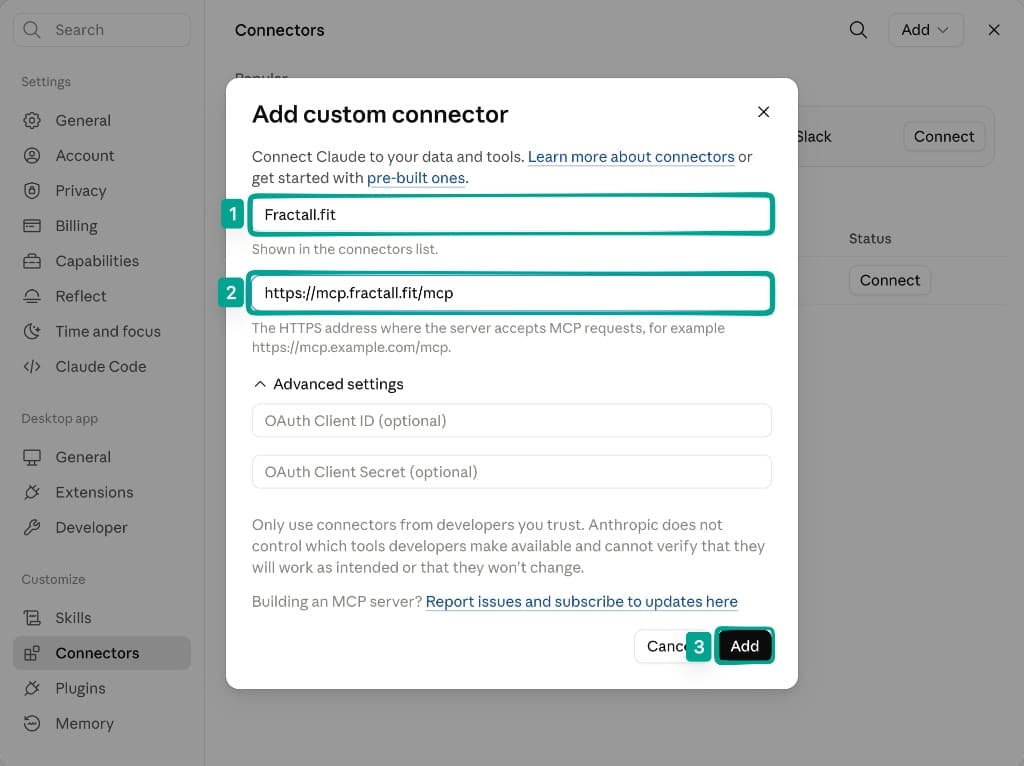
Claude's Add custom connector dialog with the name Fractall.fit and the URL https://mcp.fractall.fit/mcp filled in.

Quick answer

To connect your athletes' training data to ChatGPT or Claude, pick one of three routes. Upload a CSV or Excel export to a chat: it works on free plans, and the answer is only as fresh as the file. Connect a live Google Sheet through the assistant's Google Drive connector: it reads the sheet where it lives, and you keep the sheet up to date. Or add a connector to your athlete monitoring app, such as Fractall's, so the assistant reads the current numbers straight from the app with nothing copied. Upload to try it once, use the sheet if your data already lives there, and use a connector for weekly questions.

Pick a route

The three routes, side by side

Which one fits depends on where your squad's data lives today and how often you want to ask about it.

RouteStays current?What the assistant sees
1. Upload a fileNo: a snapshot of the day you exported itThe rows and columns in the file
2. Live spreadsheetUsually; check it sees new rowsThe sheets you let it open
3. Connector to your monitoring appYes: it reads the app when you askLoad, ACWR, wellness and more
A rule of thumb: upload a file to try the idea once, use a live sheet if the spreadsheet is already where your squad's data lives, and use a connector if your data is in a monitoring app and you want to ask about it every week. Once connected, our guide to ChatGPT and Claude for S&C coaches has the questions worth asking and the privacy settings in detail.

Route 1

Upload a CSV or Excel export

The quickest test. It works on free plans, and the data is frozen at the moment you exported it.

  1. 1

    1. Export one clean table

    Headers in the first row, one row per athlete per session, and no merged cells, blank rows or second table on the same sheet. OpenAI's help page asks for this, and warns that values inside images or scanned tables may not be read reliably.

  2. 2

    2. Upload it to a new chat

    In ChatGPT or Claude, attach the CSV or Excel file to your message. In Claude, Excel files need Code execution and file creation switched on; it is on by default on Free, Pro, Max and Ultra.

  3. 3

    3. Ask, and check the working

    Both assistants analyse a spreadsheet by writing and running Python. OpenAI's own advice is to review the code and assumptions before relying on the result, which is good advice for an ACWR worked out from raw rows.

Limits as the vendors stated them on 19 November 2026: ChatGPT accepts spreadsheets up to about 50 MB on Free and paid plans, and Free users can upload 3 files a day. Anthropic's help pages gave two different upload limits for Claude, so check the current one in the app if your file is large. The catch is the same on both: the answer describes the squad on the day you exported. If you keep your data in our athlete monitoring spreadsheet template, it already has one row per session and is ready to upload.

Route 2

Connect a live Google Sheet or Excel file

The assistant reads the spreadsheet where it lives, so you stop re-uploading. You still keep the sheet.

ChatGPT: open Settings, then Plugins, and connect Google Drive. Google Sheets are read through the Google Drive app, and availability depends on your plan, country and workspace. For Excel on SharePoint or a work or school OneDrive, use the SharePoint app; OpenAI says it does not support personal OneDrive accounts.
Claude: the Google Drive connector is available to all users and can read Sheets, as text. The Microsoft 365 connector works on every plan, and on Free, Pro, Max and Ultra you can connect a personal Microsoft account to reach OneDrive. On Team and Enterprise plans, an owner enables the Google Workspace connectors first, and a work Microsoft 365 account needs consent from a Microsoft admin.
Two cautions. Both assistants' Google Drive connections can also create, move or edit files (ChatGPT may ask you to confirm first, and Claude asks by default), so connect a view-only copy of the squad sheet if you only want it read. And Anthropic says Google Docs added to a chat stay in sync with Drive, but neither vendor said the same about Sheets on 19 November 2026, so after you edit the sheet, ask about the new rows to check the assistant sees them. When the spreadsheet starts taking more time than the coaching, our guide to Excel alternatives for athlete monitoring covers what to move to.

Route 3

Add a connector to your athlete monitoring app

A connector lets the assistant ask your monitoring app for numbers it has already calculated, at the moment you ask.

These connectors are built on MCP, the Model Context Protocol, which its maintainers describe as “an open-source standard for connecting AI applications to external systems”. Your athlete monitoring app runs an MCP server; ChatGPT or Claude connects to it and calls its tools, such as “get this team's load”, when your question needs them. Nothing is copied into a spreadsheet; what the tools return goes into the chat, so the privacy settings below apply.
  1. 1

    Claude: add a custom connector

    Open Customize, then Connectors, click Add, then Add custom connector, and paste the server URL your app gives you. Fractall's is https://mcp.fractall.fit/mcp. Free plans allow one custom connector. On Team and Enterprise, an owner adds it first and each person then clicks Connect.

  2. 2

    ChatGPT: install the app's plugin

    On 19 November 2026, OpenAI's help page listed its Add custom MCP server option for Business, Enterprise and Edu workspaces, with read-only access on Pro, on ChatGPT web. Fractall's setup takes another path: in ChatGPT Desktop, switch to Work, open Plugins, click Add, then Add a marketplace, and install Fractall.fit from it.

  3. 3

    Sign in and allow access

    A browser window opens for the app. Check the email is yours and click Allow. Then ask something simple, such as listing your teams, to confirm it works.

Both vendors warn that a connector from an untrusted developer can expose your data or try to steer the assistant, so only add one from a company you already trust with your squad's data. The full click-by-click guides, with screenshots, are Claude and Fractall and ChatGPT and Fractall.

The app question

Is there an athlete monitoring app that works inside ChatGPT?

Yes. Fractall's connector puts your squad's monitoring data inside ChatGPT and Claude.

Fractall collects session RPE and daily wellness from athletes' phones, and records injuries, physical tests and GPS imports. Its connector lets ChatGPT or Claude read that data: athletes and teams, the calendar, session RPE and training load, ACWR, wellness, injuries, physical tests, GPS sessions and cycle phases. It can also list who has not submitted RPE or wellness. In November 2026 the connector had 36 tools, all marked read-only, and it shows only the data your Fractall account can already see.
The difference from routes 1 and 2 is who does the maths. With an export, the assistant works out load and ACWR from raw rows, and you check its code. With the connector, it asks Fractall for numbers Fractall has already calculated. More on what it covers on the ChatGPT and Claude pages.

From Fractall to an answer in ChatGPT or Claude

1

Athletes submit session RPE and a daily wellness check-in from their phones, and Fractall calculates load and ACWR.

2

You add Fractall's connector once in Claude or ChatGPT and allow access in the browser.

3

You ask a question about your squad, and the assistant reads the current numbers from Fractall to answer it.

Other routes

When Fractall isn't the pick

A connector is the best route for weekly questions about a squad you already monitor in an app. Sometimes a simpler route is enough.

  1. 1

    Your squad's data already lives in a sheet you keep well

    Route 2 costs nothing beyond your ChatGPT or Claude plan. Keep the sheet clean, share a view-only copy, and check the assistant sees new rows.

  2. 2

    You want one answer, once

    For a single question before one match, an uploaded export does the job. Check the working before you act on it.

  3. 3

    Your club uses another monitoring app

    Ask your vendor whether it offers an MCP connector before you move anything. In Claude, the custom connector steps above work with any MCP server URL. In ChatGPT, follow the vendor's own guide, because OpenAI limits custom MCP servers by plan.

Before you connect

What happens to your athletes' data

Wellness, injuries and cycle data are health data. Two settings and one habit matter most.

On ChatGPT's personal plans, training on your chats is on by default; switch it off under Settings, Data controls, Improve the model for everyone. On Claude's consumer plans, Anthropic trains on chats only if you allowed it; check that Settings, Privacy, Help improve our AI models is off. The habit: on ChatGPT Free, Plus and Pro, OpenAI says a thumbs up or down can let it use the whole conversation for training even after you opt out, and Anthropic says it keeps feedback conversations for up to 5 years. If a chat names athletes, skip the thumbs. Business and Team plans on both sides do not train on your data by default, though Anthropic says thumbs feedback on Team can still be used. Our ChatGPT and Claude guide for S&C coaches covers retention and temporary chats in more detail.
OpenAI help centre pages opened 19 November 2026: Uploading files to ChatGPT, Data analysis with ChatGPT, Connected apps in ChatGPT, Connecting custom MCP servers in ChatGPT, Google Drive app, SharePoint app, How your data is used to improve model performance, Data controls in ChatGPT. Anthropic pages opened 19 November 2026: Upload files to Claude, Create and edit files with Claude, Use Google Workspace connectors, Connect to Microsoft 365, Get started with custom connectors using remote MCP, and the privacy centre articles on model training and feedback. MCP definition: modelcontextprotocol.io. Both vendors rename menus often, so menu names are as of November 2026. Fractall connector tools counted from Fractall's code on 24 November 2026. ChatGPT free plan: tested by Fractall in November 2026.

FAQs

Common questions about connecting athlete data to AI

How can I connect my athletes' training data to ChatGPT?

Three ways. Upload a CSV or Excel export to a chat, which works on the free plan but goes stale the moment the squad trains again. Connect Google Drive from Settings, then Plugins, so ChatGPT can read a Google Sheet where it lives. Or add a connector to your athlete monitoring app, which lets ChatGPT read the current numbers without you copying anything.

Is there an athlete monitoring app that works inside ChatGPT?

Yes. Fractall's connector, in open beta on the Pro AI plan, lets ChatGPT and Claude read your squad's session RPE and load, ACWR, wellness, injuries, physical tests, GPS and calendar from Fractall. In November 2026 it had 36 tools, all marked read-only, and it only shows data your Fractall account can already see.

Does it work on the free ChatGPT or Claude plan?

Uploading a file works on both free plans, though ChatGPT Free allows 3 uploads a day. Claude Free allows one custom connector, which is enough for Fractall. On ChatGPT, Fractall's connector worked on a free account when we tested it in November 2026. OpenAI's help page listed its own custom MCP server option for Business, Enterprise and Edu on 19 November 2026; Fractall's setup guide uses ChatGPT Desktop's plugin marketplace instead.

Can ChatGPT or Claude change my athletes' data?

Through Fractall's connector, no: every tool it exposes reads data and none writes. Through Google Drive the answer is different, because both assistants can create, move or edit files there; ChatGPT may ask you to confirm first, and Claude asks by default. Share a view-only copy of the sheet if you only want it read.

What does it cost?

Uploading a file and connecting Google Drive cost nothing beyond your ChatGPT or Claude plan. Fractall's connector is part of the Pro AI plan, €32.50 a month or €27.08 a month billed annually, and Fractall has a one-month free trial with no card.

Connect Fractall to Claude or ChatGPT

Start your one-month free trial, no card. Your athletes log RPE and wellness from their phones, and your assistant reads the numbers from Fractall.

Start free trial

Related guides