

Athlete Buy-In for Strength and Conditioning Coaches
Athletes stop filling in wellness and RPE surveys because they get nothing back. How to design the exchange so participation holds without chasing.
Published
The position
A reminder is a cost you pay every week, forever
Reminder-driven participation decays because nothing about it compounds. You spend the same effort each week for the same submissions, and the data stops the moment you do.
Quick answer: athlete buy-in fails because the exchange is one-sided. Athletes spend roughly 30 seconds a day submitting wellness and RPE data and get nothing back they can see. Give them their own numbers and the habit stops depending on your reminders.
Every coach who has run a monitoring system for a full season knows the curve. Week one, everyone submits. Week three, you are messaging four players. By week ten you have either accepted 60% response rates or you have built chasing into your Monday.
Buy-in gets treated as a motivation problem, so the fixes aimed at it are motivational: a squad briefing, or a rule with a consequence attached. Those hold for a few weeks. What they do not change is the reason participation decays, which is that the athlete is doing unpaid work.
This guide covers what athletes get back in most monitoring setups (nothing they can see), the four categories of data worth returning to them, what to withhold, and how to keep the collection side under 30 seconds.
What compounds and what doesn't
The arithmetic
Count what the athlete actually receives
Add up the athlete's side of a season and it usually comes to zero. They pay in attention every day and receive nothing they can point at.
~30s
Per athlete, per day
Five wellness items in the morning, one session rating in the evening.
~2h
Across a 40-week season
30 seconds on six days a week for 40 weeks. Small daily, real annually.
0
Numbers returned to them
In most setups the athlete types a score into a box and never sees it again.
Value exchange
The trade an athlete makes when they submit monitoring data: the time and attention they spend, against what they get back that they can use. When the return is zero, participation depends entirely on the coach enforcing it.
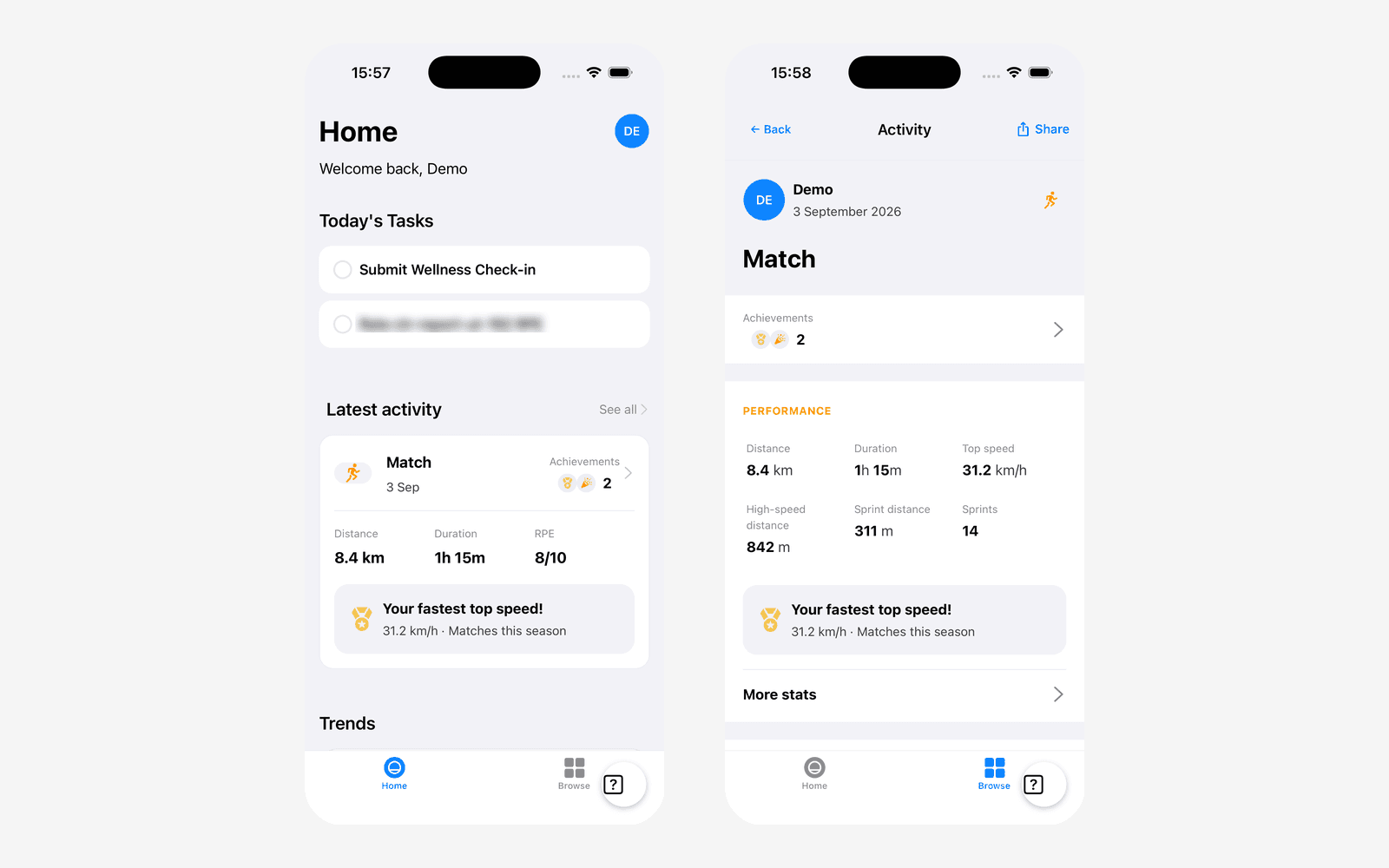
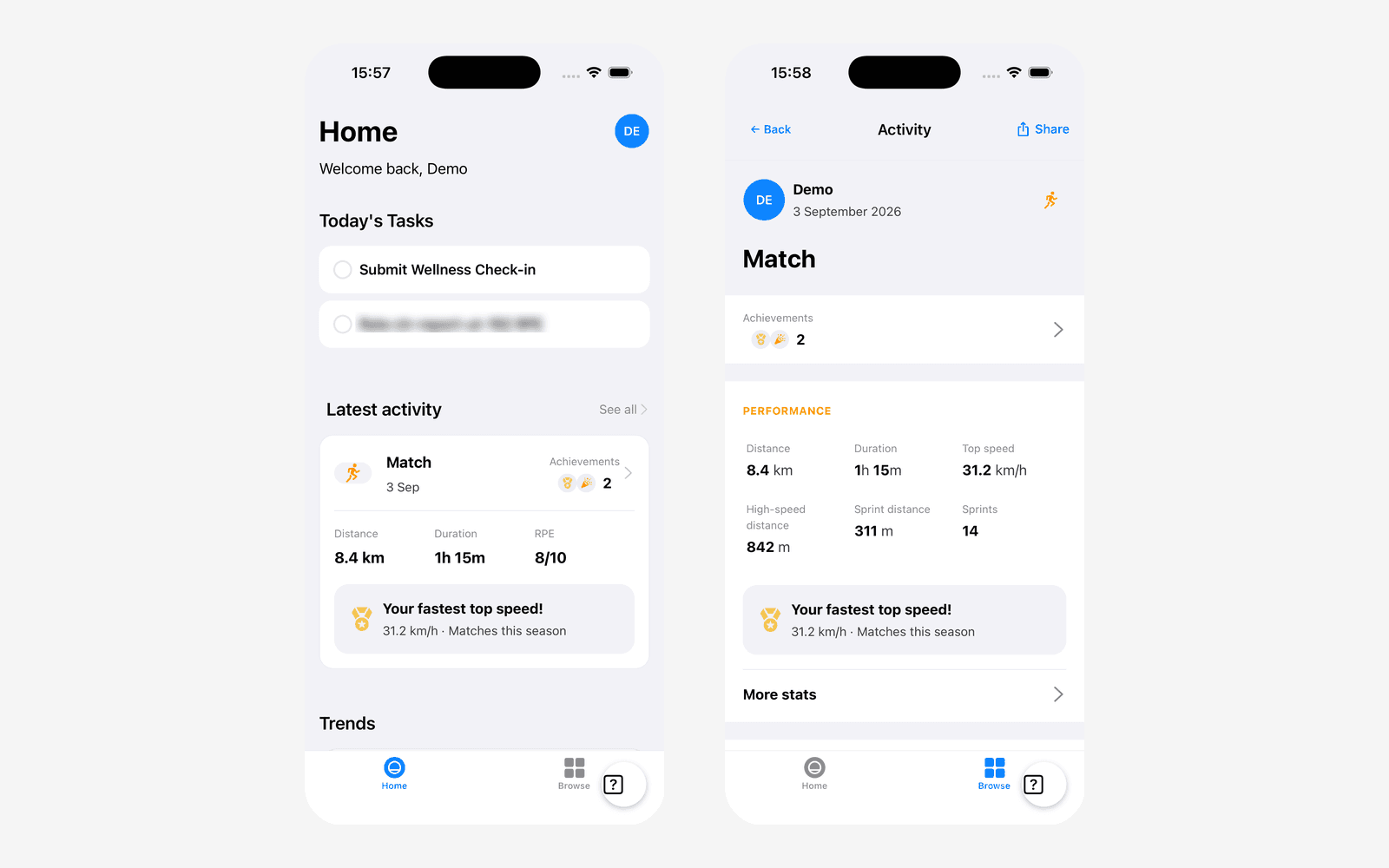
Example: An athlete rates a session 8/10 and sees, that evening, that they covered 8.4 km at a top speed of 31.2 km/h, and that it was their fastest of the season. The rating cost them one tap and returned something they will tell someone about.
The coach side of that trade is well served. You get a dashboard, ACWR, monotony, strain, and a readiness picture across the squad. The athlete generated all of it and gets a habit with no output. Framed that way, a 60% response rate is not a discipline problem. It is what you would predict.
The athlete's half
Four things an athlete will open an app for
Athletes open apps for their own numbers, not the team's. Each category below passes the same test: the athlete cannot get it anywhere else, and it says something about them specifically.
| What to return | Why the athlete cares | Where it comes from |
|---|---|---|
| Output from the session they just rated | It answers the question they ask each other on the way home: how far did we actually run, and how fast. | A GPS export, or a wearable if the squad has them. See what to track in the GPS metrics guide below. |
| Their physical test results, positioned | A jump height means nothing on its own. Against their own last test, it becomes a number they want to move. | Testing days, run two to four times a season. |
| Their own trend, not the squad's | It answers whether today's soreness is normal for them. An athlete who can see six weeks of their own data starts self-regulating unprompted. | The wellness and RPE data they already submit. No new input needed. |
| Progress markers and personal bests | A best is the only monitoring output an athlete will screenshot. It turns the record into something they own rather than something you keep. | Derived from data already collected. |
Don't push these back to the athlete
- Squad rankings on subjective wellness. Ranking sleep and soreness turns the questionnaire into a competition to look fine.
- Their ACWR or an injury-risk flag. A ratio they cannot act on reads as a warning about their body and invites self-diagnosis.
- Clinical or injury detail beyond what they reported themselves.
- Anything selection-relevant that a coach should say in person first.
The withheld list matters as much as the returned list. Handing an athlete every number you hold is not transparency, it is offloading interpretation onto someone without the context to do it. The test we apply: could the athlete act on this without a conversation? Distance and top speed pass. A rising acute to chronic ratio does not.
Which metrics are safe to return also depends on the group. An athlete who can see sprint counts will chase sprint counts. That is an argument for choosing carefully, not for returning nothing.
This week's work
Keep the athlete's side under 30 seconds
The exchange only works while the athlete's cost stays low. Every question you add raises the price of the same return, so the survey has to be defended rather than extended.
- 1
Cap the daily set at five items
Sleep, fatigue, soreness, mood and stress cover the McLean-style core. A sixth question should displace one of those, not join them.
- 2
Tie the prompt to a real session
A generic 8pm reminder gets ignored. A task that appears because the athlete was on the sheet for tonight's session is specific to them, and it clears once it is done.
- 3
Return something on the screen where they submit
If an athlete has to navigate somewhere else to see their own data, they will not. Put the trend under the task list.
- 4
Make one thing a week worth telling someone about
A season best or a test improvement. One is enough. The point is that the app occasionally tells the athlete something they did not already know.
- 5
Brief the squad on what you do with it
Athletes tolerate collection they understand. Say which decisions the data changes, including the ones that go against them, such as a session being pulled.
The ratio, not the count
See the collection side
Fractall collects wellness, RPE and body pain through a native athlete app, with the coach dashboard on the other end.
Build in public
What the Fractall athlete app does today, and what we're building
The app handles collection, returns the athlete's own trends, and shows them the GPS numbers from their sessions. The screenshots below were taken from a pre-release build on 6 September 2026.
Live in the athlete app
| Athlete-facing | Status | Detail |
|---|---|---|
| Wellness, RPE and body pain submission | Live | Native iOS and Android app. The day's tasks are generated from the sessions the athlete is actually scheduled for, and submissions queue when the phone is offline. |
| Their own wellness, RPE and body pain trends | Live | Trend screens the athlete opens themselves. Available in English, Portuguese, Spanish and Arabic. |
| Session output: distance, top speed, sprints | Live | The Activities screen lists every session the athlete took part in. Each one shows distance, duration, top speed, high-speed distance, sprint distance and sprints, with accelerations and decelerations under More stats. Volleyball squads on Vert see jumps and jump height instead. |
| Personal bests and progress markers | Live | Numbers on the session screen are ranked against the athlete's own history and marked New personal record, 2nd-best effort or 3rd-best effort. Milestones mark match counts, activity counts and match minutes. |
| Shareable session card | Live | One headline number with distance, duration, top speed or high speed beneath it, sent to an Instagram Story, saved, or shared elsewhere. |
| Their physical test profile | Planned | Physical testing runs in the coach platform across six categories. There is no athlete-facing view of it yet. |
The physical profile is the piece we think does the most for an older squad, and it's the one we haven't built yet. Testing already runs in the coach platform across six categories: anthropometric, power, mobility, strength, speed and aerobic. The seeded catalogue covers countermovement and drop jumps, the seven FMS screens, back squat and deadlift and IMTP, 10m and 30m sprints and max velocity, and the Bronco, 30-15 IFT and Yo-Yo tests.
A coach reads that as a squad profile. An athlete would read it as a status: where they sit, and whether March to September moved it. None of that requires new data collection, only an athlete-facing view of testing that already happens. You can see the coach side of it on the physical tests page, and the collection side on RPE monitoring.

How the exchange works
The athlete gets two tasks tied to sessions they are actually on, and clears them in about 30 seconds.
The coach reviews wellness, load, ACWR, monotony and strain, and plans against it.
The athlete gets their own output and trend back on the same screen, which is why they submit again tomorrow.
Try both halves on a free trial
Collection, athlete trends, the athlete session view and the coach dashboard are all in the 30-day trial. No card required.
FAQs
Athlete buy-in questions
Short answers for coaches whose monitoring system works on paper and not in week ten.
How do I get athletes to actually fill in the wellness survey?
Should athletes see their own wellness scores?
Does showing athletes their GPS data make them compete in training?
How many wellness questions is too many?
Can the Fractall athlete app show players their own session data?
Coach checklist
- Write down what your athletes currently receive for submitting. If the honest answer is nothing, that is the problem.
- Cut the daily set to five items before adding anything.
- Move one athlete-facing number onto the screen where they submit.
- Pick the metrics you are willing to return, and the ones you are not.
- Brief the squad on one decision the data changed last month.
- Check whether your tool returns anything to the athlete at all before renewing it.
Related guides
Winter Break Training Plan for Football S&C Coaches
Winter break training plan for football: what two weeks off costs, the minimum to prescribe at home, and how to log it so January ACWR stays honest.
Two Games a Week: What Wellness Data Shows Before Match 2
Fractall data on football teams playing two games a week: on match morning, fatigue sits less than half as far above normal. How to read wellness between games.
ChatGPT and Claude for Strength and Conditioning Coaches
What an S&C coach can ask ChatGPT or Claude about squad load, wellness and injuries, and the privacy settings to change before any athlete data goes in.