

Dashboard preferences
Set ACWR calculation method and risk zone thresholds so load metrics match your own model.
When to adjust preferences
Fractall ships with sensible ACWR defaults. Use this page when you want a specific calculation method or custom risk zone thresholds.
Open Dashboard Preferences
From Wellness & Load, click the gear icon next to the title. You can also expand Wellness & Load and open Dashboard Preferences directly from the sidebar.
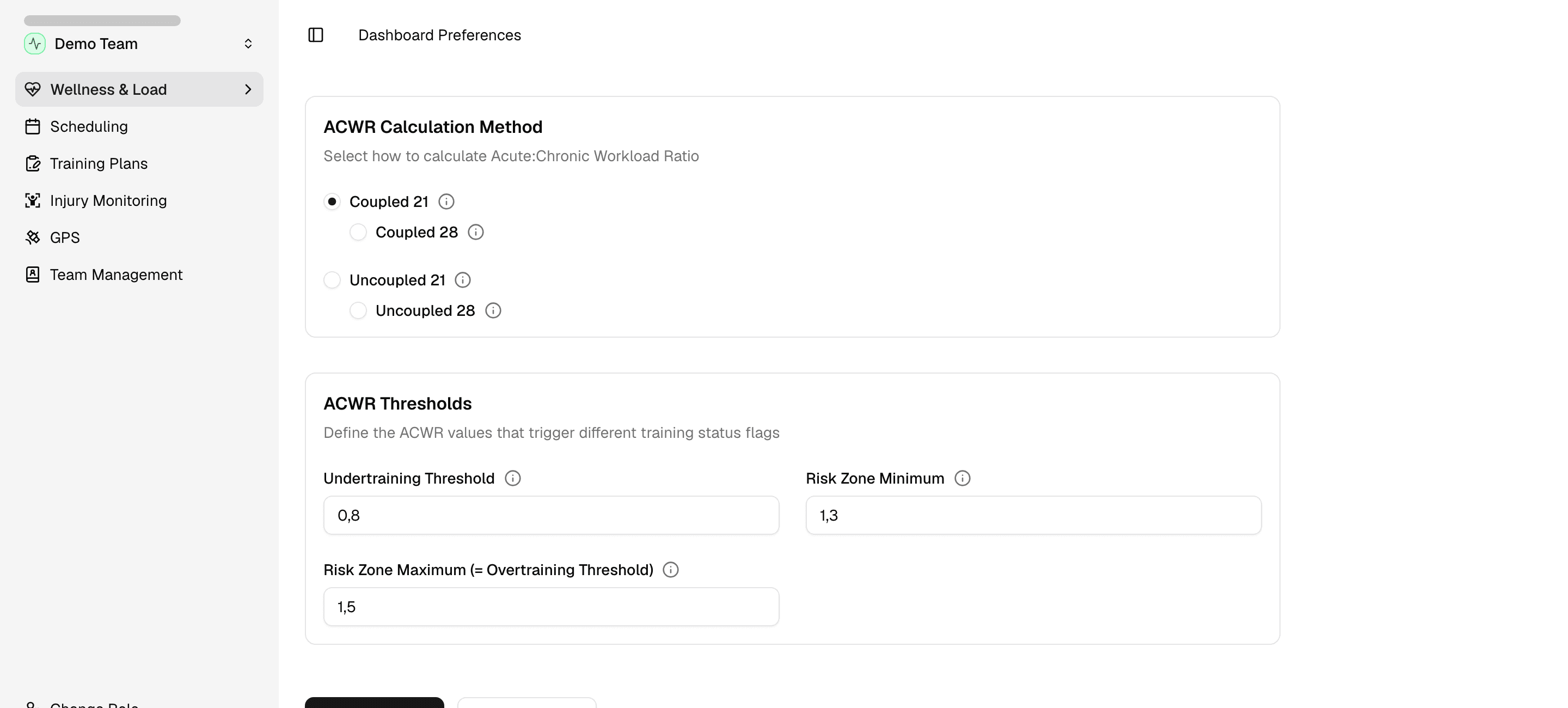
ACWR calculation method
Choose how Fractall compares acute load to chronic load:
Coupled 21/Coupled 28— acute and chronic windows use overlapping days.Uncoupled 21/Uncoupled 28— windows do not overlap.
The number (21 or 28) is the chronic window length in days. Pick the method you prefer.
Risk zone thresholds
Three fields control how ACWR zones appear in Wellness & Load:
Undertraining Threshold— values below this mark under-training on ACWR widgets.Risk Zone Minimum— values at or above this mark enter the risk zone.Risk Zone Maximum(overtraining threshold) — values above this mark move from risk into overtraining.
The sweet spot sits between undertraining and the start of the risk zone. Red and yellow flags on Overview and load tables use these boundaries.
Save or reset
Click Save to apply changes across ACWR widgets on the Training Load tab. Click Cancel to discard unsaved edits.
Click Reset to Defaults to restore Fractall's built-in method and thresholds.